.svg)
 Healthcare
 Finance
 Retail
 SaaS & Digital
 eCommerce
 Education
 Salesforce
  HubSpot
 Pipedrive
 Mailchimp
 Klaviyo
 Zendesk
  Intercom
 Freshdesk
 HelpScout
  Front
Front Jira
Jira Slack
Slack  MS Teams
 Zoom
Zoom Google Sheets
  Zapier
  Integrately
 Make
Make  Webhooks



 Sign In
 MS Teams


TL;DR
- AI in customer service has split into two layers: the response layer (chatbots, routing, auto-replies) and the analysis layer (thematic analysis, sentiment detection, entity mapping on support data).
- Most teams invest heavily in faster responses but barely touch the analysis side: understanding why customers reach out and fixing the root causes.
- AI-powered feedback analytics on support tickets surfaces the 5-7 themes driving 60-70% of your volume, detects sentiment shifts agents and scores miss, and maps issues to specific products, features, and processes.
- The real ROI isn't faster replies. It's fewer reasons to contact support in the first place.
- A 90-day implementation path: connect ticket data (Month 1), layer sentiment and set alerts (Month 2), close the loop and measure theme reduction (Month 3).
- Zonka Feedback's Support Feedback Analytics is built for this: thematic analysis on tickets, agent-level sentiment, entity mapping, and AI-powered signal routing. Schedule a demo to see it in action.
Most teams think AI in customer service means faster replies. Shorter wait times. Chatbots that handle the easy stuff so agents can focus on the hard stuff.
That's not wrong. But it's incomplete.
The support teams getting the most out of AI aren't just responding faster. They're using AI to understand why customers are reaching out in the first place: which product issues generate the most tickets, which processes create the most friction, which agents need coaching on specific topic areas. And then they're fixing those root causes so the tickets stop coming.
Our AI Feedback Analytics 2025 report found that 87% of CX leaders still rely on manual analysis of verbatim customer feedback. In support organizations handling thousands of tickets a month, that means the richest source of operational intelligence: what customers actually say when something goes wrong: sits unread in a queue. The patterns are there. Nobody's connecting them.
This article covers both sides of AI in customer service: the response layer that handles volume, and the analysis layer that reduces it. But we'll spend more time on the second, because that's where the biggest gap is. And where the biggest gains are hiding.
Wondering what that shift looks like in practice? Let's find out.
How AI Is Reshaping Customer Service Operations
AI in customer service isn't one thing. It's two distinct capabilities that most teams conflate. Understanding the difference is what separates organizations that manage volume from organizations that reduce it.
The Response Layer: Faster, Always-On, Scalable
This is the AI most people think of when they hear "AI customer service." Chatbots that handle Tier 1 queries: order status, password resets, FAQ answers, return policies. Intelligent ticket routing that reads intent and sends the conversation to the right queue instead of bouncing it around. Auto-replies and AI-suggested responses that cut agent handle time and keep tone consistent across a 50-person team.
The impact is real. Zendesk reports that 70% of CX leaders plan to integrate generative AI into customer touchpoints within the next two years, and teams already using AI for response automation consistently see 30-40% ticket deflection and significantly reduced wait times. Add 24/7 availability and multilingual support, and the business case for response-layer AI is straightforward.
Chatbots have matured significantly since the rigid decision-tree era. Modern conversational AI uses natural language understanding so customers type naturally instead of choosing from preset menus. The best implementations connect to backend systems: order databases, CRM records, and knowledge bases, so the bot resolves the issue instead of just acknowledging it. A customer asking "where's my order?" gets a tracking link and an estimated delivery time, not a redirect to a help article.
Intelligent routing has gotten smarter, too. AI reads the customer's message, classifies the intent (billing dispute vs. feature request vs. bug report), assesses the complexity, and routes it to the agent or queue best equipped to handle it. No more round-robin. No more customers explaining their issue three times because they landed in the wrong queue.
Agent assist is the third piece: AI that works alongside human agents in real time. Suggested replies, knowledge base recommendations surfaced mid-conversation, automatic summarization of long ticket threads so an agent picking up a transferred ticket doesn't start from zero. These tools don't replace agents. They make every agent faster and more consistent.
This layer is well-understood, well-adopted, and genuinely valuable. But it solves for speed. It doesn't solve for cause. A chatbot can answer "Where's my order?" a thousand times a day. It can't tell you why a thousand customers are asking that question this week when last week it was only two hundred.
The Analysis Layer: Understanding Why Customers Reach Out
This is the less-covered half. And for support leaders trying to improve operations (not just manage volume), it's the most important one.
Analysis-layer AI doesn't respond to tickets. It reads across thousands of them to surface patterns that no human team could spot manually. Thematic analysis clusters support conversations into recurring topics and sub-topics. Sentiment detection catches the frustration that a 4/5 CSAT score won't reveal. Entity mapping ties every piece of feedback to specific products, features, agents, and processes.
The outcome isn't faster resolution. It's fewer tickets. When you identify that 30% of your support volume traces back to a confusing proration policy on mid-cycle upgrades, and you fix that policy, you've done something a chatbot never could: you've removed the reason customers needed help in the first place.
Think about what that means operationally. A support team processing 5,000 tickets a month with 30% tied to a single root cause is spending the equivalent of 1.5 full-time agents on one fixable issue. The cost isn't in the handling time. It's in the repetition. Every ticket about the same confusion is a ticket that shouldn't exist. Analysis-layer AI makes those invisible costs visible.
Most teams invest heavily in the response layer and barely touch the analysis layer. In simple terms: that's like buying a faster ambulance instead of fixing the road.
| Response Layer | Analysis Layer | |
| What it does | Handles and deflects tickets | Understands why tickets exist |
| Core AI | Chatbots, NLU, routing, auto-replies | Thematic analysis, sentiment detection, entity mapping |
| Measures | Deflection rate, handle time, first response time | Theme distribution, root cause resolution, ticket reduction |
| Outcome | Faster, cheaper support | Fewer reasons to contact support |
| Best for | Volume management | Operational improvement |
The strongest support operations run both layers. The response layer manages today's volume. The analysis layer ensures tomorrow's volume is smaller. But most teams are stuck running only the first half. The rest of this article focuses on the second: how AI feedback analytics is transforming support operations from the inside out.
5 Ways AI Feedback Analytics Is Changing Customer Service
The response layer gets the headlines. The analysis layer gets the results. Here are five specific ways AI-powered feedback analytics is reshaping how support teams operate.
1. Turning Ticket Themes Into a Reduction Roadmap
Every support team knows their tickets fall into categories. Billing questions. Onboarding confusion. Feature bugs. But most teams categorize manually: an agent tags each ticket, and the tags are inconsistent, incomplete, and lag behind reality. One agent tags a ticket "billing." Another tags the same type of issue "payment." A third doesn't tag it at all because they're focused on resolution time, not taxonomy. The result: your theme data is noisy, delayed, and unreliable.
AI thematic analysis changes this entirely. Instead of relying on agent tags, the AI reads across thousands of ticket conversations and clusters them into themes and sub-themes automatically. Not just "billing": billing → proration confusion, billing → invoice formatting, billing → refund process. That granularity is what turns a vague category into a specific fix.
Here's a scenario we've seen play out: a SaaS support team running 3,000 tickets a month discovered through thematic analysis that "billing confusion" was their number two theme. When they drilled into sub-themes, the culprit was specific: proration on mid-cycle plan upgrades. The pricing page didn't explain it. The in-app notification was unclear. One product fix and one copy update reduced billing tickets by 28% in six weeks. That's not a support improvement. That's a product improvement driven by support data.
The themes also shift over time, and AI catches the shifts. After a new feature launch, a new theme might spike that didn't exist last month. A seasonal pattern might emerge: refund requests climbing every January. Manual tagging wouldn't catch these in real time. AI surfaces them within days, often before the support lead even notices the volume change.
Without AI doing the clustering, that sub-theme stays buried inside 3,000 tickets. Someone might notice "billing comes up a lot." Nobody pinpoints the exact friction point. And nobody connects it to a product fix that could have prevented the next 900 tickets.
2. Catching What CSAT Scores Miss
CSAT is the most common metric in customer service. Salesforce's State of Service research found that 88% of service professionals say customer expectations are higher than ever, and CSAT is the fastest signal that those expectations are or aren't being met.
But CSAT has a blind spot. A customer who gives a 4/5 with the comment "I guess it was fine but I still don't understand why this happened in the first place" isn't really a 4. The number looks okay. The sentiment underneath tells a different story.
AI sentiment analysis catches these gaps at scale. It reads the actual language in support conversations: not just the survey score after: and detects frustration, confusion, and resignation that a numerical rating won't surface. A "resolved" ticket with three back-and-forth exchanges where the customer's tone shifted from polite to clipped to disengaged? That's a customer who got their answer but lost confidence in your team. The score won't show it. The sentiment will.
When applied at the agent level, sentiment trends reveal coaching opportunities that quarterly performance reviews miss entirely. An agent might carry a 4.2 CSAT average but show consistently declining sentiment on a specific ticket type. That's a training gap, not a performance problem. And AI spots it weeks before a manager would. Conversely, an agent with a modest CSAT score but consistently high sentiment may be handling the hardest tickets and doing it with empathy. Without sentiment data, that agent looks mediocre. With it, they look like exactly the person you want on your escalation queue.
The shift: CSAT tells you how the interaction ended. Sentiment tells you how it actually felt. Support leaders who track both get a dramatically clearer picture of what's working and what needs attention.
3. Mapping Feedback to Agents, Products, and Processes
"Customers are unhappy about response time." That's not useful. Which customers? On which queue? For which product?
Entity mapping ties every piece of support feedback to the specific noun it references: a product, a feature, an agent, a location, a process. The difference is the difference between "response time is a problem" and "customers contacting Tier 2 about the API integration are unhappy about response time, and the median wait for that queue is 4.2 hours."
Now the fix has an owner. The API integration team knows it's their queue. The support lead knows it's a staffing issue on Tier 2, not a training issue. The product team knows the API documentation might be the upstream cause. One data point, routed to three teams, each with a specific action.
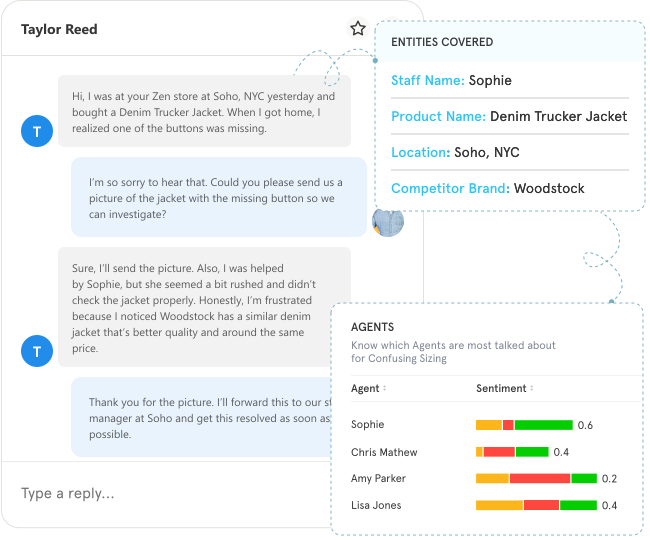
Entity mapping also works at the agent level. When feedback mentions a specific agent by name or interaction ID, the system connects sentiment and themes to that agent's performance profile. Support leaders can see not just average CSAT by agent, but which themes each agent handles well and where they struggle. Agent A might excel at billing tickets but show declining sentiment on technical troubleshooting. That's a coaching insight that a CSAT average would flatten into invisibility.
For multi-location businesses, entity mapping is even more powerful. A retail chain with 200 stores can see which locations generate the most negative feedback, which product categories drive complaints at each location, and which staff members are mentioned positively. That specificity turns a generic "customer satisfaction is down in the Southeast region" into "the Atlanta location has a checkout speed problem and the Miami location has a returns policy confusion problem." Different stores, different fixes.
Without entity mapping, those signals sit in a dashboard as averages. Averages hide the specific failures that drive customer churn.
4. Closing the Loop: From Insight to Coaching to Fix
Surfacing insights is step one. Making sure someone acts on them is where most support analytics programs fall apart. We've seen teams with beautiful dashboards full of theme data that nobody opens on Tuesday morning. The analysis existed. The action didn't.
Feedback intelligence closes that gap with automated workflows. A low-sentiment ticket doesn't just appear in a report: it creates a follow-up task, assigns it to the agent's supervisor, and tracks whether the recovery happened within the SLA window. A recurring theme that crosses a volume threshold triggers a notification to the product or engineering team, with context and examples attached. The insight arrives where decisions get made: Slack, Jira, email, CRM: not in a dashboard someone has to remember to check.
The closed-loop workflow looks like this:
- Detect: AI flags a pattern: rising negative sentiment on a specific ticket type, or a theme that crossed the alert threshold.
- Route: the signal goes to the right person: supervisor for agent-level issues, product team for feature-level issues, ops lead for process-level issues.
- Recover: the assigned owner follows up within a defined window. For individual tickets, that's a customer recovery. For systemic themes, it's a root-cause fix.
- Measure: did the fix work? Did the theme's volume drop? Did sentiment on that topic improve? Track over time.
Without the Measure step, you're hoping the fix worked. With it, you know. A support team that identifies "confusing error messages" as a top theme, rewrites 12 error messages, and then tracks that theme's ticket volume over the next 30 days is running an evidence-based improvement cycle. That's different from running a quarterly survey and presenting a deck.
This is what separates feedback intelligence from feedback collection. Collection tells you what happened. Intelligence routes a signal to someone who can change what happens next. The loop doesn't close when the data is analyzed. It closes when the fix is measured.
5. Predicting Escalations Before They Happen
The most expensive support interactions are escalations: tickets that move from agent to supervisor to manager, consuming time, damaging customer relationships, and often ending in concessions that could have been avoided.
AI spots the patterns that precede escalations. Rising negative sentiment over three or more interactions with the same customer. Specific language patterns: "I've already explained this twice," "This is the third time I'm calling about this." Theme combinations that correlate with escalation: billing + access + high-priority, for instance.
When the system detects these early signals, it can intervene proactively: flag the ticket for a senior agent before the customer asks for a supervisor, or route it to a specialist who handles that theme well. Gartner predicts that 60% of enterprises will deploy agentic AI in customer experience to drive autonomous actions by 2026. In support, "autonomous" increasingly means: the AI doesn't wait for the escalation. It prevents it.
The pattern recognition gets more sophisticated over time. AI learns which combinations of signals are the strongest predictors: not just sentiment alone, but sentiment + ticket reopen + specific theme + customer tier. A VIP customer with declining sentiment across two reopened tickets about the same integration issue is a different risk level than a new user frustrated about a password reset. The system learns to weight these differently and route accordingly.
The ROI on escalation prevention is direct. Fewer escalations means lower cost-per-ticket, higher agent morale (nobody enjoys escalations), and better customer outcomes. One prevented escalation is worth more than ten deflected Tier 1 chats. And because the prevention is based on actual pattern data rather than gut instinct, it scales without adding headcount.
What Support Leaders Actually Measure (And What They Should)
Most support dashboards track the same five metrics: ticket volume, first response time, average resolution time, CSAT, and maybe customer effort score. These are operational basics. They tell you how the machine is running. But they don't tell you whether the machine is getting better.
AI feedback analytics adds a second set of metrics that answer a fundamentally different question: not "how fast are we?" but "are we reducing the reasons customers need us?"
| Traditional Support Metrics | Feedback-Driven Metrics |
| Ticket volume | Theme distribution: what are tickets actually about? |
| First response time | Sentiment trend by agent, queue, and ticket type |
| Average resolution time | Entity-level escalation rate: which products/features drive escalations? |
| CSAT score | Root-cause resolution rate: did the fix reduce that theme's volume? |
| Tickets per agent | Signal-to-action velocity: how fast do insights become fixes? |
The first column tells you your team handled 3,200 tickets last month with a 4.1 CSAT. The second column tells you that 34% of those tickets were about three product issues that engineering could fix, that sentiment is declining specifically on the onboarding queue, and that the fix shipped two weeks ago for the top theme reduced that theme's volume by 22%.
Here's what makes this shift powerful: traditional metrics are backward-looking. They summarize what already happened. Feedback-driven metrics are forward-looking. Theme distribution tells you what your next sprint should fix. Sentiment trends by queue tell you where to deploy coaching resources next week. Root-cause resolution rate tells leadership whether the support team is actually reducing friction, not just managing it.
The most telling metric we've seen teams adopt is signal-to-action velocity: how many days pass between AI surfacing an insight and someone acting on it. If your platform detects a theme spike on Monday and the product team ships a fix on Thursday, that's a four-day signal-to-action cycle. If it takes six weeks, you're still running quarterly reviews dressed up with AI branding.
If your dashboard tells you resolution time improved but can't tell you which product issues are generating the tickets, you're measuring speed. Not quality. The shift to feedback-driven metrics is what turns a support team from a cost center into an intelligence source for the rest of the business.
How to Get Started: A 90-Day Approach
You don't need a 12-month roadmap to start using AI feedback analytics on your support data. Here's a practical 90-day path that gets you from "we have tickets" to "we know what's driving them and we're fixing the root causes."
Month 1: Connect and Discover. Connect your ticket data: whether that's Zendesk, Freshdesk, Intercom, or Salesforce Service Cloud: to a feedback analytics platform. Run AI thematic analysis on the last 90 days of closed tickets. Don't try to build a custom taxonomy from scratch. Let the AI surface what's actually in the data. You'll have your top 5-7 themes within the first week.
Most teams are surprised by at least one finding: a theme they didn't realize was driving that much volume. We've seen teams discover that "login issues" accounted for 18% of their tickets when they estimated it at 5%. That discovery alone reshapes where they invest engineering time. By the end of Month 1, you should have a clear theme map and an initial list of root causes worth investigating.
Month 2: Layer Sentiment and Set Alerts. Add sentiment analysis to the thematic view. Build agent-level and queue-level sentiment dashboards. Set up threshold alerts: "notify the support lead when negative sentiment on the onboarding queue exceeds 20% in a 7-day window." Start routing low-sentiment tickets to supervisors for review.
This is where coaching conversations start to shift from "your CSAT is low" to "your sentiment on billing tickets specifically is declining: let's look at why." That specificity changes how agents receive feedback. It's not a vague judgment. It's a data point tied to a specific topic they can work on. By the end of Month 2, you should have agent-level sentiment baselines and at least two active alerts configured.
Month 3: Close the Loop. Take your top theme from Month 1 and work with the product or ops team to fix the root cause. Track whether that theme's ticket volume drops over the following weeks. Report to leadership not on ticket volume or CSAT alone, but on theme reduction: "We identified that 28% of tickets were about X. We fixed the root cause. That theme's volume is down 30%."
That's a story a CFO understands. It connects support operations to product improvement and revenue protection in a way that traditional metrics never could. By Month 3, you've demonstrated that support data can drive business decisions, not just operational reports. The question of whether to build or buy this capability is worth deciding early: purpose-built platforms get you to Month 1 in days, not months.
Where Zonka Feedback Fits
Zonka Feedback's Support Feedback Analytics is built for the analysis layer we've been describing. It's not a chatbot platform. It's not a ticket deflection tool. It's the layer that reads across your support conversations and tells you what's driving tickets, which agents need support on which topics, and where the root causes live.
What it does specifically for support teams:
- Thematic analysis on tickets and conversations that surfaces recurring issues automatically: not just categories, but sub-themes granular enough to drive a specific product or process fix.
- Sentiment detection at the agent and queue level that catches frustration, confusion, and tone shifts that scores alone miss. Coaching becomes specific: "your sentiment on billing tickets is declining" rather than "your CSAT is low."
- Entity mapping that ties every piece of feedback to specific products, features, processes, locations, and agents. Signals become specific enough to route.
- Role-based dashboards so support leads see operational trends, agents see their own performance signals, and product teams see the feature-level feedback that drives roadmap decisions.
- AI agents that route low-sentiment tickets and theme spikes to the right person without manual triage. When a threshold is crossed, the right person knows within minutes, not days.
The support teams using it aren't just responding to customers better. They're feeding insights back to product, engineering, and operations: insights that only exist because someone read the patterns in support data instead of just counting the tickets.
From Faster Replies to Fewer Tickets
The support teams that stand out in the next few years won't be the ones who reply fastest. They'll be the ones who understand their customers deeply enough that fewer of them need to reach out at all.
Speed matters. Chatbots matter. Routing matters. But these are table stakes now: every team will have them. What separates the best support operations from the rest is the analysis layer: the ability to read patterns across thousands of conversations, detect sentiment shifts before they show up in CSAT, map issues to specific products and processes, and close the loop so that every insight becomes a fix.
That's the shift from managing a cost center to running an intelligence function: one that feeds product decisions, shapes process improvements, and turns every support conversation into a signal the business can act on.
The teams that start now won't just keep up. They'll set the standard.