.svg)
 Healthcare
 Finance
 Retail
 SaaS & Digital
 eCommerce
 Education
 Salesforce
  HubSpot
 Pipedrive
 Mailchimp
 Klaviyo
 Zendesk
  Intercom
 Freshdesk
 HelpScout
  Front
Front Jira
Jira Slack
Slack  MS Teams
 Zoom
Zoom Google Sheets
  Zapier
  Integrately
 Make
Make  Webhooks




 MS Teams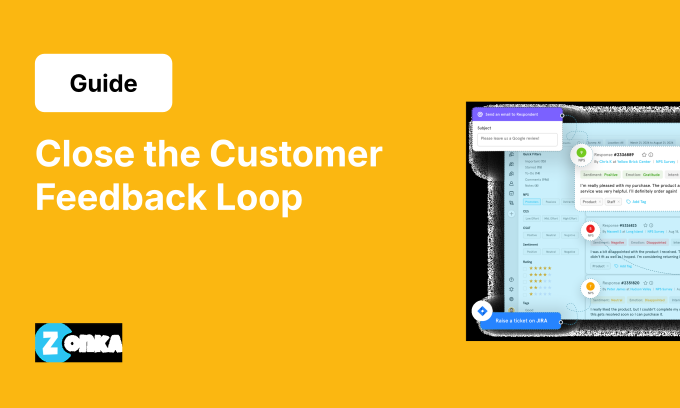


TL;DR
- Closing the feedback loop means building a system where every NPS response triggers the right action, reaches the right person, and gets resolved within a defined timeframe.
- Modern loop closure runs on automation: AI routes responses based on sentiment and urgency, not just scores. Manual processes miss 50-60% of critical alerts.
- Two loops matter: inner loop (individual response) and outer loop (systemic fixes). You need both.
- Automated workflows cut response time from 36 hours to 4 hours and increase detractor recovery rates by 40%.
Your NPS program collects feedback. Responses land in a dashboard somewhere. Someone reviews them when they have time. A few urgent ones get forwarded to support. Most sit unread.
This is how most NPS programs fail. Not because the survey design is wrong, but because there's no system for turning feedback into action. The businesses that get value from NPS treat loop closure as a process, not a task. They automate the routing so urgent feedback doesn't get buried. They track completion rates the same way they track response rates.
This guide covers how automation removes manual work, where AI changes routing outcomes, what workflows look like for each segment, and how to measure whether the loop is actually closing.
What Is Closing the NPS Feedback Loop?
Closing the feedback loop means acting on the feedback you collect. A customer scores you 3 out of 10 and explains why. You acknowledge it, investigate, fix what's fixable, and let them know what changed. Most businesses only close the loop on detractors sporadically. Passives get ignored. Promoters get a generic thank-you. The result is that Net Promoter Score becomes a reporting exercise instead of a mechanism for improvement.
Loop closure has two components: individual response (someone reaches out to that specific customer and resolves their concern) and systemic action (teams identify patterns and fix root causes so issues stop recurring). Most businesses only do the first part, which is why NPS programs stall.
The Two Types of Feedback Loops: Inner vs Outer
The inner loop is individual. A detractor complains about billing. Someone from finance responds, fixes the error, and confirms resolution. It's reactive, one-to-one, and usually urgent.
The outer loop is systemic. You notice 18 detractors mentioned billing errors in the last month. Finance investigates, finds a bug in auto-renewal, and fixes it. Billing complaints drop 70% the following month. It's proactive, pattern-driven, and creates lasting improvement.
You need both. Inner loop prevents immediate churn. Outer loop prevents recurring issues. Businesses that only run inner loops see NPS scores stay flat because they're constantly fighting the same fires. Businesses that connect both loops see sustained improvement over time.
Manual vs Automated Loop Closure: The 2026 Reality
Manual loop closure means someone reviews NPS responses in a spreadsheet or dashboard, decides which ones need follow-up, emails the appropriate person, and hopes it gets handled. This works at low volume. It breaks at scale.
Here's what manual processes look like in practice across businesses we've worked with:
| Metric | Manual Process | Automated Process |
| Loop closure rate | 42-55% | 85-92% |
| Average response time | 36 hours | 4 hours (critical), 18 hours (standard) |
| FTE required | 2-3 full-time | 0.5 FTE (review only) |
| Detractor conversion | 18% | 34% |
| Missed urgent alerts | 23% | 2% |
The performance gap comes from three failure modes in manual processes.
-
First, someone has to notice the urgent response. If they're reviewing feedback once a day, a critical detractor sits unaddressed for hours.
-
Second, routing depends on whoever's reviewing the responses knowing who should handle what. They forward the detractor email to support, but support thinks it's a billing issue and forwards it to finance. Three days pass.
-
Third, nothing tracks whether the issue actually got resolved. The loop looks closed because someone responded, but the customer is still unhappy.
Automated loop closure removes all three failure points. Responses get routed instantly based on score, sentiment, and account data. SLAs start the moment feedback arrives. Completion tracking confirms whether the issue resolved and whether the customer's sentiment improved. Businesses that automate see 2x higher completion rates and 40% better detractor recovery.
The Complete NPS Loop Closure Framework
Every closed loop follows the same six steps: trigger, route, respond, resolve, verify, report. Most businesses skip steps three through six and wonder why their NPS program isn't driving improvement.
-
Trigger is the signal that action is needed. In automated processes, the trigger is a rule: score below 7, comment contains negative sentiment, account renewal within 60 days, customer is enterprise tier. The more specific your trigger rules, the better your routing accuracy.
-
Route determines who gets the alert. A billing complaint goes to finance. A product bug goes to engineering. A support issue goes to the customer success team. Role-based routing means the right person sees the feedback immediately, not after it's been forwarded three times. Automation handles this based on keywords in the comment, account metadata, and historical patterns.
-
Respond is the initial acknowledgment. The customer needs to know you saw their feedback and are working on it. This happens within hours for critical issues, within 24 hours for standard detractors. The response doesn't have to solve the problem yet. It has to confirm you're paying attention.
-
Resolve is where you fix the actual issue. The customer complained about slow support response times. You investigate their ticket history, identify the bottleneck, and get their issue resolved. This step takes longer than the response, but it's what determines whether the detractor converts to a passive or stays detracted.
-
Verify confirms the customer is satisfied with the outcome. This can be a follow-up email asking if the issue is resolved, a second NPS survey 7-14 days later, or a check-in call for high-value accounts. Verification is where most manual processes fail. Someone responds, maybe fixes the issue, but never confirms the customer is happy.
-
Report tracks whether the loop actually closed and what the outcome was. Did the detractor move to passive? Did they renew? Did the same issue come up again? Reporting turns loop closure from a reactive process into strategic intelligence.
This framework works for all three segments. Detractors need all six steps. Passives typically skip the resolve step unless there's a specific issue. Promoters get a simplified version: trigger, route, respond (thank you + referral request), report (track referral conversion). The process stays consistent. The urgency and depth change based on segment.
AI-Powered Sentiment Detection and Routing
Score-based routing treats all 6s the same and all 4s the same. Sentiment-based routing recognizes that a 6 with "absolutely terrible experience, never using this again" is more urgent than a 4 with "it's fine, just not my thing." The score tells you they're unhappy. The comment tells you how unhappy and why.
-
AI sentiment detection analyzes the text, not just the number. It measures emotional intensity, identifies the specific issue, and predicts churn risk. A detractor who mentions billing gets routed to finance. A detractor who mentions a specific agent gets routed to the support manager for coaching. A detractor who's up for renewal in 30 days gets flagged as critical and escalated immediately.
-
Entity extraction is what makes this possible. The AI doesn't just detect that the sentiment is negative. It identifies what they're negative about: product feature, support agent, pricing, onboarding, billing, delivery time. This creates routing accuracy that manual review can't match. The feedback goes directly to the team that can fix it, not to a generic "detractor queue" where someone has to figure out who should handle it.
-
Urgency prediction combines sentiment intensity with account data. A detractor with high emotional intensity, high account value, and a renewal date in 45 days gets flagged as critical. A detractor with neutral-to-negative sentiment, low account value, and no upcoming renewal gets standard priority. This prevents urgent issues from getting buried under volume.
Here's how sentiment routing changes outcomes in practice. Manual routing sends all detractors to a support queue. Average response time is 24 hours. Critical accounts wait the same as everyone else. Sentiment routing creates priority lanes. Critical detractors get 4-hour SLAs and executive attention. Standard detractors get 24-hour SLAs. The result is 40% better recovery rates on high-risk accounts without adding headcount.
The routing logic looks like this: Score 3 + comment mentions "billing error charged me twice, very frustrated" + sentiment intensity HIGH + entity identified as billing + account tier Enterprise = urgent Zendesk ticket created + assigned to billing specialist + Slack alert to CS lead + 4-hour SLA timer starts. This happens in seconds. Manual review would take hours and might miss the billing specialist routing entirely.
Automated Workflow Examples by Segment
Detractors, passives, and promoters need different workflows. The trigger rules, routing logic, and success metrics all change based on segment. Here's how automation handles each one.
1. Detractor Workflows: Critical vs Standard
The key advantage of AI-powered automation is that it doesn't treat all detractors the same. It automatically triages based on churn risk, routing urgent cases to executive attention and standard cases to the appropriate team.
Critical Detractor (High Churn Risk):
Trigger: Score 0-6 + at least one high-risk criteria (enterprise account, renewal within 60 days, repeat detractor, or explicit churn mention).
Example: Score = 2. Comment = "support was terrible, waited 3 days for a response, considering switching to a competitor." Account tier: Enterprise. Renewal: 45 days.
Automated response: AI detects high sentiment intensity + churn language + enterprise tier. Zendesk ticket created (priority: Urgent). Assigned to support manager and account CSM. Slack alert sent: "Critical detractor: Acme Corp, renewal at risk, explicit churn mention." Email to CSM includes full context: account value, renewal date, past NPS scores, support ticket history. SLA: 4 hours.
Outcome: Support manager reaches customer within 2 hours, investigates the delayed ticket, resolves the issue, offers service credit. Follow-up survey 7 days later shows score improved to 7. Detractor converted to Passive. Loop closed.
Standard Detractor (Lower Urgency):
Trigger: Score 0-6 but no high-risk criteria. Example: Score 5, comment "product is okay but missing some features I need."
Automated response: Routed to product team (24-hour SLA, no executive escalation). Product manager reaches out, asks which features, explains roadmap, offers workaround. Feature request logged in backlog. Customer added to beta list. Follow-up when feature ships: "You mentioned needing [feature]. We just launched it. Want to try it?"
The automation ensures urgent cases get 4-hour SLAs and executive attention while standard cases get appropriate handling without consuming disproportionate resources. This is what lets a 2-person CS team handle 500+ NPS responses per month with 90% loop closure rates.
2. Passive Batch Outreach
Passives scored 7-8. They're not unhappy enough to churn immediately, but they're not loyal enough to ignore competitor offers. Batch outreach works better here than individual responses.
-
Trigger: AI identifies 12 passives who mentioned "missing feature X" in their comments over the last 30 days.
-
Routing: Grouped into a batch. Automated email campaign created: "We noticed you rated us 7. We're working on [feature X]. Want early access when it launches?"
-
Timing: Email scheduled to send Tuesday at 10am (optimal engagement time based on historical open rates).
-
Tracking: Monitors responses. 4 customers reply asking for beta access. Added to product beta program. Follow-up NPS sent after they've used the feature for 30 days. Result: 3 of the 4 move from passive to promoter.
Passive outreach doesn't need the same urgency as detractor recovery, but it does need consistency. Automation ensures passives don't get ignored just because they're not screaming. For more on converting passives, see our guide on engaging NPS passives.
3. Promoter Activation Workflow
Promoters scored 9-10. They're satisfied. The goal is turning satisfaction into advocacy: referrals, testimonials, case studies, reviews.
-
Trigger: Score 9 or 10 confirmed.
-
Response: Automated thank-you email sent within 24 hours. Personalized with their name and references their specific positive comment if they left one.
-
Wait period: 3 days. Gives them time to feel appreciated before the ask.
-
Referral request: Automated email with unique referral link. "We're glad you're happy with [product]. Know anyone else who might benefit? Here's a referral link that gives you both 20% off."
-
Tracking: If they refer someone, automated reward delivery. If they leave a comment praising a specific feature, auto-forwarded to product team and added to testimonials queue for marketing review.
Referrals from promoters have 3-5x higher conversion rates than cold outreach. The automation makes sure you're asking every promoter, not just the ones someone remembered to follow up with. For a full promoter activation strategy, see our guide on getting NPS promoters to promote you.
Role-Based Routing: Who Handles What
Loop closure breaks down when nobody knows who's supposed to respond. A detractor complaint lands in a generic inbox. Support thinks it's a product issue. Product thinks it's a support issue. Three days pass. The customer churns.
Role-based routing solves this by defining clear ownership. Every type of feedback has a default owner. Every owner has a backup in case they're unavailable. The routing happens automatically based on the feedback content and account data.
| Alert Type | Owner | Response SLA | Success Metric |
| Critical detractor (churn risk) | CS Manager + Account Owner | 4 hours | Detractor converts to passive or promoter within 30 days |
| Standard detractor | Support team or assigned CSM | 24 hours | Issue resolved, customer confirms satisfaction |
| Product feedback (feature request, bug) | Product team | 48 hours | Feature logged in backlog, customer notified |
| Support quality issue (agent mentioned) | Support Manager + QA team | 12 hours | Agent coaching completed, customer recovery attempted |
| Billing/payment issue | Finance team | 12 hours | Billing error resolved, customer refunded or credited |
| Passive (no specific issue) | Account Manager (batch outreach) | 7 days | Passive moves to promoter or engagement increases |
| Promoter | Marketing/Growth team | 72 hours | Referral request sent, testimonial collected |
| Executive escalation | CX Director or VP | 2 hours | High-value account retained, root cause identified |
The routing logic looks at three things: what the customer said, who they are, and how urgent it is. A detractor who mentions "billing" gets routed to finance. A detractor who mentions a specific agent name gets routed to the support manager. A detractor from a $100k account with a renewal in 30 days gets routed to the CS manager and account owner simultaneously.
Backup routing prevents single points of failure. If the primary owner doesn't respond within the SLA, the alert escalates to their manager. If the manager doesn't respond, it escalates to the director. This ensures nothing sits unaddressed just because someone was out of office or missed an alert.
The success metrics in the table matter because they define what "loop closed" actually means. It's not "someone responded." It's "the issue got resolved and the customer's sentiment improved." Tracking outcomes is what turns loop closure from a checkbox into a performance metric.
Automated Theme Analysis and Systemic Fixes
The inner loop handles individual responses. The outer loop prevents the same issues from recurring. Most businesses never build the outer loop, which is why their NPS scores stay flat even when they're closing individual loops consistently.
Outer loop automation works by analyzing all feedback over a time window (usually 30 days), identifying recurring themes, and surfacing them to the teams that can implement systemic fixes. A support team can resolve 50 individual billing complaints. A product team can fix the billing bug that's causing those complaints.
Here's how automated theme analysis runs in practice. Every week, the system analyzes all NPS comments from the past 30 days. It clusters them into themes based on content similarity and keyword frequency. The output looks like this:
- "Support wait time too long" mentioned by 47 detractors (34% of all detractors)
- "Missing feature X" mentioned by 23 passives (31% of all passives)
- "Sales team was great" mentioned by 31 promoters (28% of all promoters)
- "Onboarding was confusing" mentioned by 18 detractors (13% of all detractors)
Each theme gets scored by impact: how many people mentioned it, what their NPS distribution looks like, and whether it's trending up or down compared to last month. High-impact themes (many mentions, trending up, mostly detractors) get flagged for immediate action.
The system then routes these themes to the appropriate teams. "Support wait time" goes to the support ops team with context: average wait time for detractors vs promoters, which channels have the longest waits, whether it's correlated with specific times of day. "Missing feature X" goes to the product team with a list of customers who requested it, their account values, and whether they're at risk of churning without it.
Product teams can integrate this directly into their backlog. Zonka can auto-create Jira tickets for high-impact themes with all the supporting data: customer quotes, account list, revenue at risk. The product manager reviews it, decides whether to prioritize it, and the ticket moves into the sprint backlog if it clears the prioritization bar.
The loop closes when you track whether the fix actually worked. Example: Week 1, AI identifies "onboarding too complex" mentioned by 18 detractors. Week 2, product team simplifies the onboarding flow and launches the update. Week 6, AI confirms "onboarding" complaints dropped by 67%. That's outer loop closure. You didn't just respond to 18 individual complaints. You fixed the root cause so future customers don't hit the same issue. For more on analyzing feedback patterns, see our guide on NPS data analysis and reporting.
This is where NPS becomes strategically valuable. Inner loop prevents churn. Outer loop drives product improvement, operational efficiency, and long-term score growth. Businesses that only run inner loops see marginal NPS gains. Businesses that connect both loops see 10-15 point improvements over 12-18 months.
Technology Stack and Integration Architecture
Loop closure at scale requires connecting multiple systems: survey platform (captures feedback, runs AI analysis, triggers workflows), CRM (stores customer data, renewal dates, feedback history), helpdesk (creates tickets for detractors), collaboration tools (sends real-time alerts), and workflow automation (connects everything without manual intervention).
The integration flow: NPS Response arrives → AI analyzes sentiment and urgency → Routes to appropriate systems (CRM logs feedback on customer record, helpdesk creates ticket if detractor, Slack sends alert if critical, product dashboard adds to theme summary for outer loop analysis). This architecture supports both inner loop (individual responses) and outer loop (systemic fixes) simultaneously without requiring separate processes.
Tracking and Accountability: Metrics That Matter
Loop closure isn't a yes/no binary. It's a system with measurable performance. These metrics tell you whether your process is working:
-
Loop closure rate: Percentage of responses that triggered action and reached resolution (acknowledged, resolved, verified). Target: 85%+ for detractors, 60%+ for passives, 70%+ for promoters. Below 60% means you have a process or capacity problem.
-
Response time: Average time from feedback received to first response. Critical detractors should average under 6 hours. Standard detractors under 24 hours. Passives under 48 hours. If response times are slipping, either SLAs are too aggressive or routing isn't working.
-
Resolution rate: Percentage of detractors who moved to passive or promoter within 30 days of loop closure. This measures whether your responses actually fix things. Target: 30-40%. Below 25% means you're responding but not solving underlying issues.
-
Auto-routing accuracy: Percentage of responses correctly routed to the appropriate team without manual intervention. Target: 95%+. Measure by checking how often tickets get reassigned after initial routing. If reassignment rate is above 10%, your routing rules need refinement.
-
Theme resolution tracking: Outer loop effectiveness. When a theme is flagged (e.g., "support wait times"), did implementing a fix reduce complaints about that theme? Track theme volume month over month. If a high-impact theme isn't declining after you "fixed" it, the fix didn't work.
Most businesses track response rates but not loop closure rates. They know how many people are filling out surveys but not how many responses are actually being acted on. Response rate measures awareness. Closure rate measures execution.
Common Loop Closure Failures and How to Fix Them
Most loop closure processes fail in predictable ways. Here are the most critical failure modes and how to design around them:
-
Responses go to a black hole: Detractor feedback lands in a shared inbox. Nobody's explicitly assigned. Everyone assumes someone else will handle it. Fix: Role-based routing with explicit ownership. Every alert has a named owner. If the owner doesn't respond within the SLA, it escalates automatically.
-
Detractors get acknowledged but never resolved: Support sends a "we're looking into this" email. The ticket sits open for weeks. The customer churns anyway. Fix: Resolution tracking and completion metrics. Loop closure doesn't count until the issue is resolved and the customer confirms satisfaction.
-
Only the inner loop exists: You respond to every detractor individually, but the same issues keep generating new detractors because the root cause never gets fixed. Fix: Weekly theme reviews where product, support, and ops teams review recurring themes and prioritize systemic fixes. Track theme volume before and after fixes to confirm they worked.
-
Nobody tracks whether the loop actually closed: You think the loop is closing because people are responding to feedback. But when you audit, only 40% of detractors actually got their issues resolved. Fix: Outcome measurement. Track whether detractors converted to passives. Track whether customers renewed. Success is outcomes, not activity.
-
Survey fatigue kills response rates: You send NPS surveys every 30 days. Response rates drop from 40% to 15% within six months. Fix: Suppression rules and careful timing. For more on managing survey frequency, see our guides on when and where to collect NPS and NPS response rate benchmarks.
Most of these failures come from treating loop closure as a task instead of a system. The system scales. The task doesn't.
Conclusion
Most businesses treat NPS as a measurement problem. They obsess over survey design, response rates, and benchmark comparisons. But the real gap isn't in the data collection. It's in the execution layer between feedback and action. Loop closure is where NPS programs either create business value or become abandoned dashboards.
The businesses that win here aren't running more sophisticated surveys. They're running tighter loops: automated routing so urgent feedback reaches the right person in hours, outer loop processes so recurring issues get fixed at the root, and outcome-based success metrics instead of activity tracking.
Start with the framework: trigger, route, respond, resolve, verify, report. Pick one segment. Automate the routing. Track whether the loop actually closes. Then expand. Most businesses try to build the entire system at once and end up with nothing that works. The ones who start small and iterate ship faster and learn more.
For the strategic foundation behind this execution, see our complete Net Promoter Score guide. For detailed NPS survey design and distribution strategies, see our guide on how to create an NPS survey.


.png)