




.svg)
 Healthcare
 Finance
 Retail
 SaaS & Digital
 eCommerce
 Education
 Salesforce
  HubSpot
 Pipedrive
 Mailchimp
 Klaviyo
 Zendesk
  Intercom
 Freshdesk
 HelpScout
  Front
Front Jira
Jira Slack
Slack  MS Teams
 Zoom
Zoom Google Sheets
  Zapier
  Integrately
 Make
Make  Webhooks




 MS Teams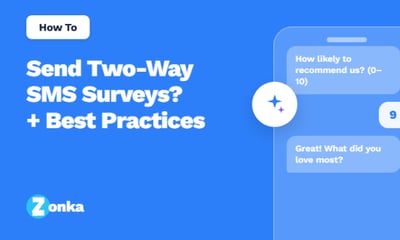



TL;DR
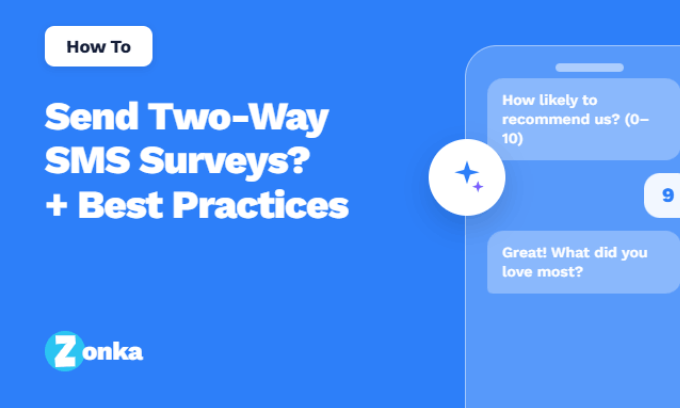
- Two-way SMS surveys let customers answer survey questions directly inside their text message thread, without needing to tap a link, open a browser, or download an app.
- Each survey question arrives as its own SMS message, and each customer reply triggers the next question, which makes the entire experience feel like a natural conversation rather than filling out a form.
- Two-way SMS surveys consistently outperform email surveys when it comes to response rate, speed, and completion, particularly for short-format feedback like Net Promoter Score and Customer Satisfaction Score.
- Because two-way SMS runs on the cellular network, it works on every phone and every carrier, including customers who don't use WhatsApp or rarely check their email.
- This guide walks you through what two-way SMS is, what two-way SMS surveys are, when to use them, how to set one up in Zonka Feedback, and the best practices that consistently lift response rates.
Most surveys die at the link.
The text arrives. The recipient reads it. They see a link, and they pause. That pause is the problem. In the fraction of a second it takes them to decide whether to tap, the survey stops feeling like a quick favor and starts feeling like a task. A browser. A loading screen. A form. Maybe a login. By the time they think about all that, the moment's gone. The phone goes back in the pocket. The feedback never happens.
Two-way SMS surveys remove the pause.
There's no link to tap, no page to load, no form to fill out. The question arrives in the message thread, and the customer replies the same way they reply to anyone else: by typing back. Each reply triggers the next question. The whole survey lives inside the conversation people are already having on their phones every day. In the US, it's sometimes called the ping-pong method, a steady back-and-forth where every reply moves the conversation one step forward.
That's why two-way SMS Surveys consistently outperform every other channel for short-format feedback. 82% of consumers check their texts within five minutes of receiving them, according to SimpleTexting's 2025 report. Email surveys, by contrast, can sit unread for hours, sometimes days. When you remove the link, you remove the only thing that was standing between your customer and their answer.
This guide walks you through how two-way SMS surveys work, when they make sense, how to set one up in Zonka Feedback, and the best practices that separate a survey people ignore from one they actually finish.
What Is Two-Way SMS?
Two-way SMS is text messaging that works in both directions. The business sends a message, the customer replies, and the business receives the reply. All of it happens through the standard SMS channel that's already on every phone.
The contrast is one-way SMS, where messages only flow outward. One-way SMS is what most appointment reminders, OTP codes, and promotional alerts use. The business sends, the customer reads, and that's the end of the interaction. Two-way SMS adds the return path. The customer can text back, and that reply becomes the next step in the conversation.
This is the foundation of conversational messaging at scale. A customer texts a keyword to a short code and gets an automated response. A support team sends a status update, and the customer texts back a question. A business sends a survey question, and the customer's reply moves the conversation to the next one.
A few things make two-way SMS uniquely powerful as a customer engagement channel:
- It works on every phone. Two-way SMS runs on the cellular network, not data. It doesn't need an app, a smartphone, or a stable Wi-Fi connection. If a customer has a phone number, you can reach them.
- It's read fast. SMS open rates hover around 98%, and most texts get read within three minutes of arrival. There's no other channel with that kind of attention.
- It's a one-on-one conversation. Even when the messaging is automated, it lands in a personal thread. That's a different kind of attention from an email blast or a push notification.
You'll see two-way SMS used for appointment reminders with confirmations, support conversations, order updates, and increasingly, customer feedback surveys.
What Are Two-Way SMS Surveys?
A two-way SMS survey is a survey that runs entirely inside a text message thread.
Each question arrives as its own SMS. The customer replies in the same thread. The next question follows based on what they answered. There's no link to tap. No browser to load. No form to fill out. The whole survey lives in the messaging app the customer already uses every day.
This is the part that makes it different from a traditional SMS survey. A traditional SMS survey is usually a text with a survey link inside it. The customer still has to tap the link, wait for a page to load, and fill out a form on their phone's browser. The same friction that kills response rates on email surveys shows up there too. A two-way SMS survey skips all of that. The question is the message. The reply is the answer.
A typical two-way SMS survey starts with a question that's easy to answer in one tap. An NPS score from 0 to 10. A CSAT rating from 1 to 5. A simple yes or no. Once the customer replies, the next question is triggered automatically. If they give a low score, the follow-up can ask why. If they give a high score, it can ask what they liked most. Every reply moves the conversation forward, exactly like the rhythm of any regular text exchange.
This format works because it matches how people already use their phones. The natural next action after reading a text is to reply to it. Which is exactly what the survey is asking them to do.
Benefits of Two-Way SMS Surveys
The case for two-way SMS surveys is shorter than the case for most channels because the benefits compound. Once you remove the link, almost everything else gets better.
Higher response rates
When the question arrives as a message and the reply path is the message thread itself, response rates climb sharply. SMS surveys typically see open rates above 90%, and two-way SMS lifts the response rate on top of that by removing the click-through step that traditional SMS surveys still depend on. For a look at the tools that handle this well, see our roundup of the best SMS Survey software.
Real-time feedback
Texts get read in minutes. Replies come in just as fast. That means you're not waiting a week for survey results, you're reading them while the experience is still fresh in the customer's head. For closing the feedback loop on a service issue or a bad transaction, that speed is the whole game.
Universal reach
Two-way SMS doesn't need a smartphone, an app install, or a data connection. It reaches customers in low-connectivity areas, customers who don't use WhatsApp, customers who never check email. If they have a phone number, you can survey them.
Lower friction, higher completion
Each question is its own message. There's no long scrolling form to fatigue people. There's no login, no captcha, no app switch. The survey starts in the customer's preferred channel and ends there. That single design choice is what lifts completion rates above what any link-based survey can manage.
Better open-ended responses
This one surprises people. Open-ended questions usually hurt completion on every other channel because typing into a form field feels like work. On two-way SMS, the natural next action is to reply to the question. So the format that kills web surveys actually works here. Customers type real answers, in their own words, because the medium is one they're already using to type real answers all day.
Multi-channel feedback in one place
Two-way SMS responses don't live in a silo. In Zonka Feedback, they land in the same inbox as feedback from your email surveys, WhatsApp surveys, and website surveys. You see the whole picture in one view.
When to Use Two-Way SMS Surveys
Two-way SMS isn't the right channel for every survey. It's the right channel for surveys where speed, reach, and reply rate matter more than long-form depth.
It's a strong fit for:
- Post-transaction feedback. Right after a purchase, a delivery, a service appointment, or a support call.
- Quick CX metrics. NPS software, CSAT software, and CES — one-question pulses for measuring loyalty, satisfaction, and effort.
- Customers without email or app access. Especially in retail, healthcare, finance, and field services.
- Time-sensitive feedback. When you need a response in minutes, not days.
- Closing the loop on a bad experience. A low rating in a text thread is something you can respond to right there, while the customer is still paying attention.
It's a weaker fit for:
- Long, multi-question research surveys. SMS works best at five questions or fewer.
- Audiences who haven't opted in to receive texts. Compliance comes first, especially in regulated markets.
- Visual surveys that need images, video, or rich media. WhatsApp or email is better for that.
How to Set Up a Two-Way SMS Survey with Zonka Feedback
Setting up a two-way SMS survey in Zonka Feedback takes a few minutes if you have a clear question in mind and a list of recipients ready. Here's the full walkthrough.
Step 1: Log in and create a new survey
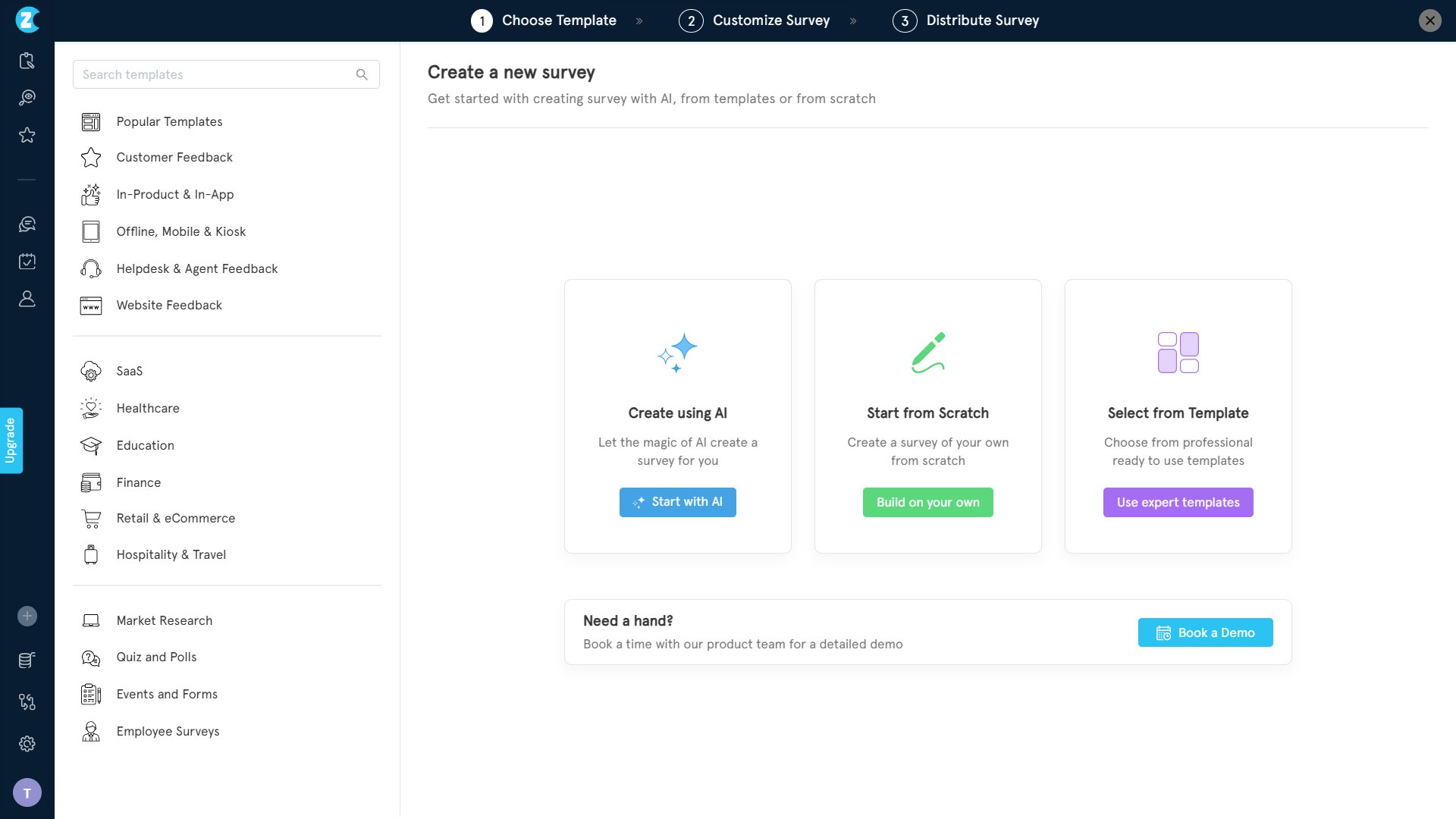
Sign in to your Zonka Feedback account. From the dashboard, click Create a Survey. You'll see three ways to start: with AI, from scratch, or from a template. For a quick two-way SMS survey, a template is the fastest path. Click Use expert templates.
Step 2: Pick a template
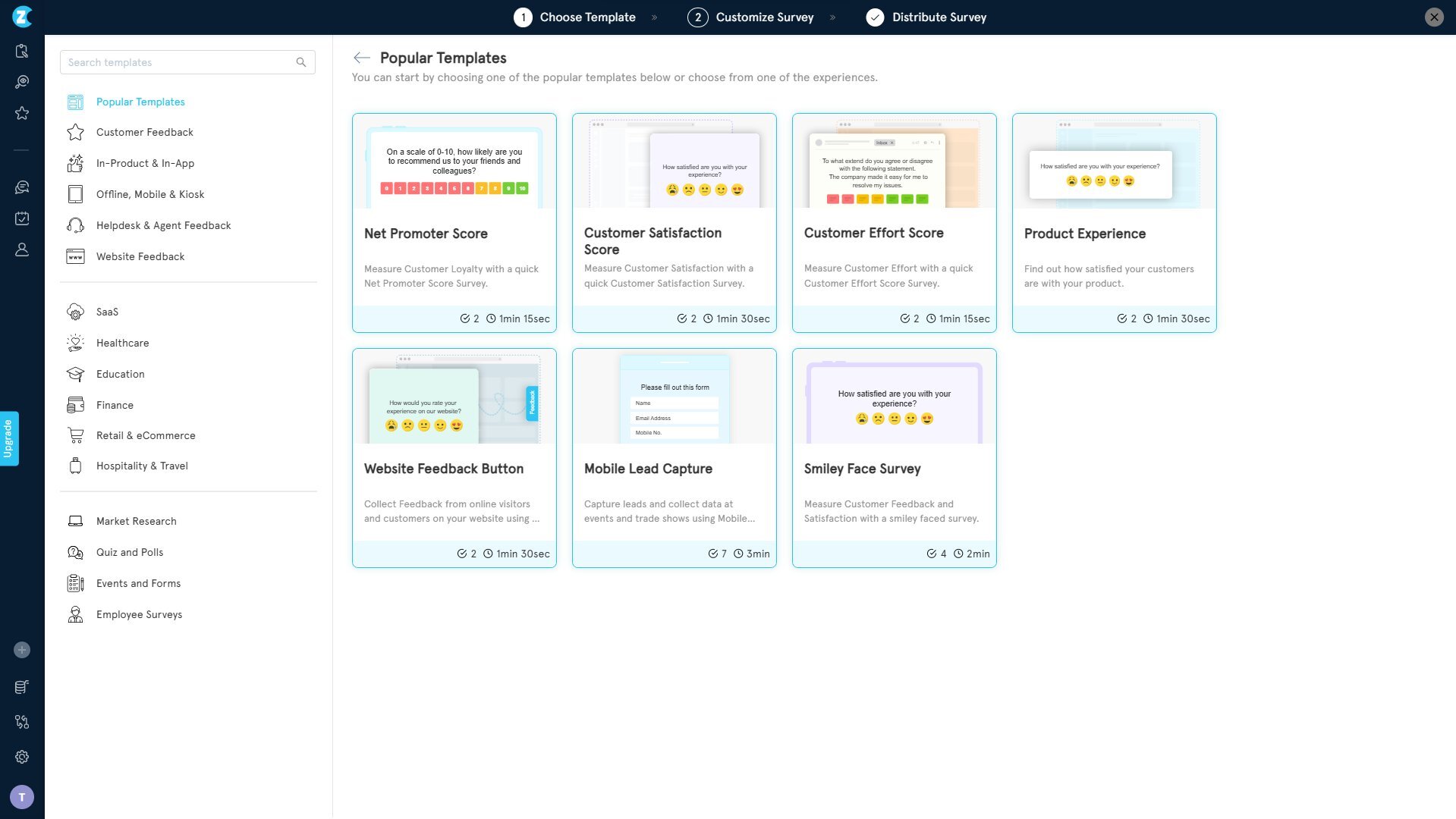
Browse the template library and choose one that matches your use case. For two-way SMS, an NPS or CSAT template is the most common starting point because they ask for a single-number reply, which is exactly what the channel is built for.
Step 3: Select SMS as your distribution channel and name your survey
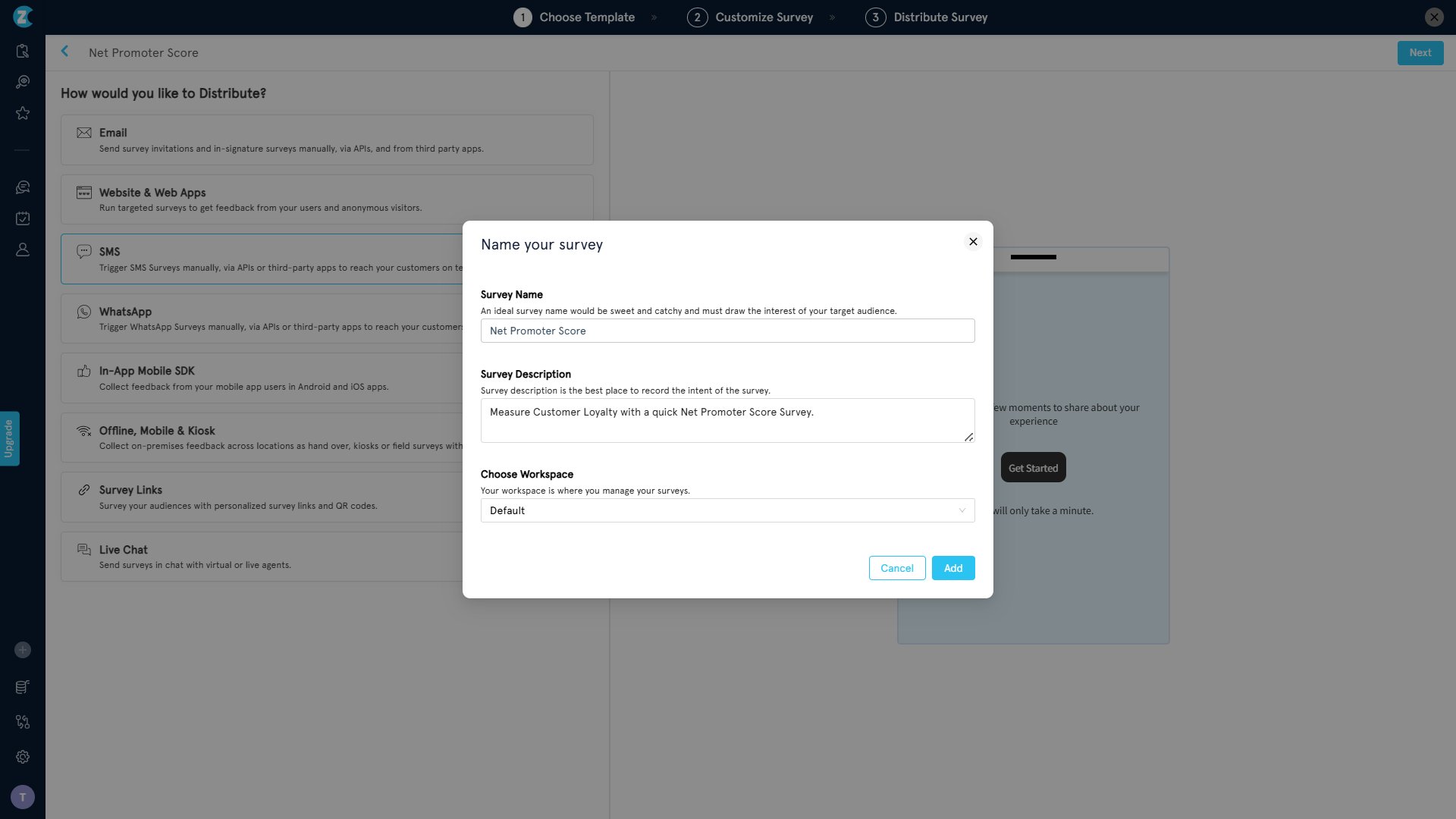
Once you've picked a template, choose how you want to distribute it. Select SMS. This is the choice that sets the survey up for the two-way conversation flow.
A modal will appear asking you to name your survey, add an optional description, and pick the workspace you want to save it in. Fill it in and click Add.
Step 4: Customize the survey in the editor
You're now in the survey editor. This is where you make the survey your own. Edit the question text, adjust the answer scale, switch the language, change the look and feel, and add survey logic if you want different follow-ups based on the score. When you're happy with the survey, click Next.
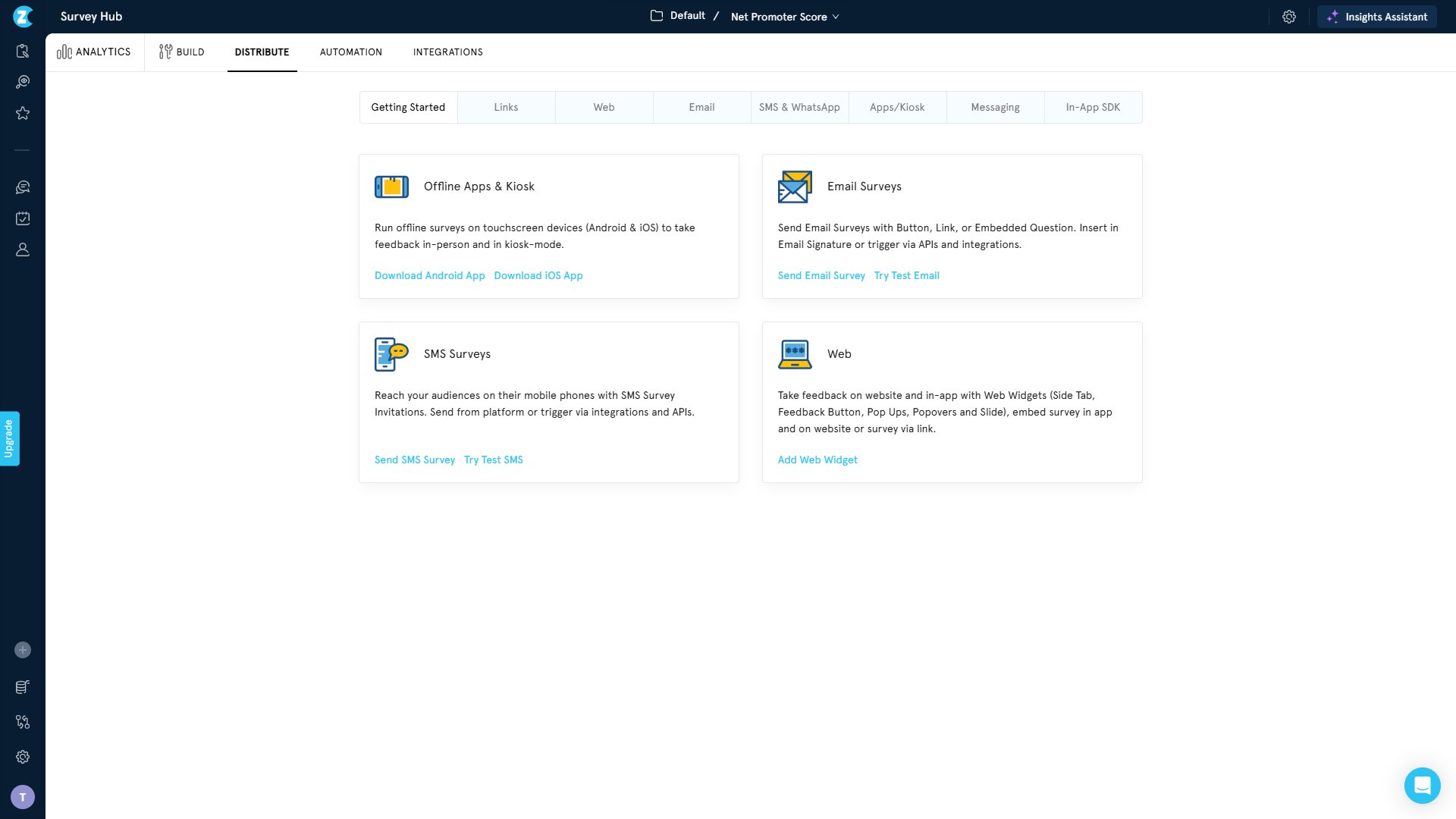
Step 5: Open SurveyHub and head to the Distribute tab
This is the part that makes the survey actually two-way. Open the SurveyHub option, find your survey in the list, and click into it. Then click the Distribute tab at the top.
Step 6: Choose "Send Two-Way SMS survey from Zonka Feedback"
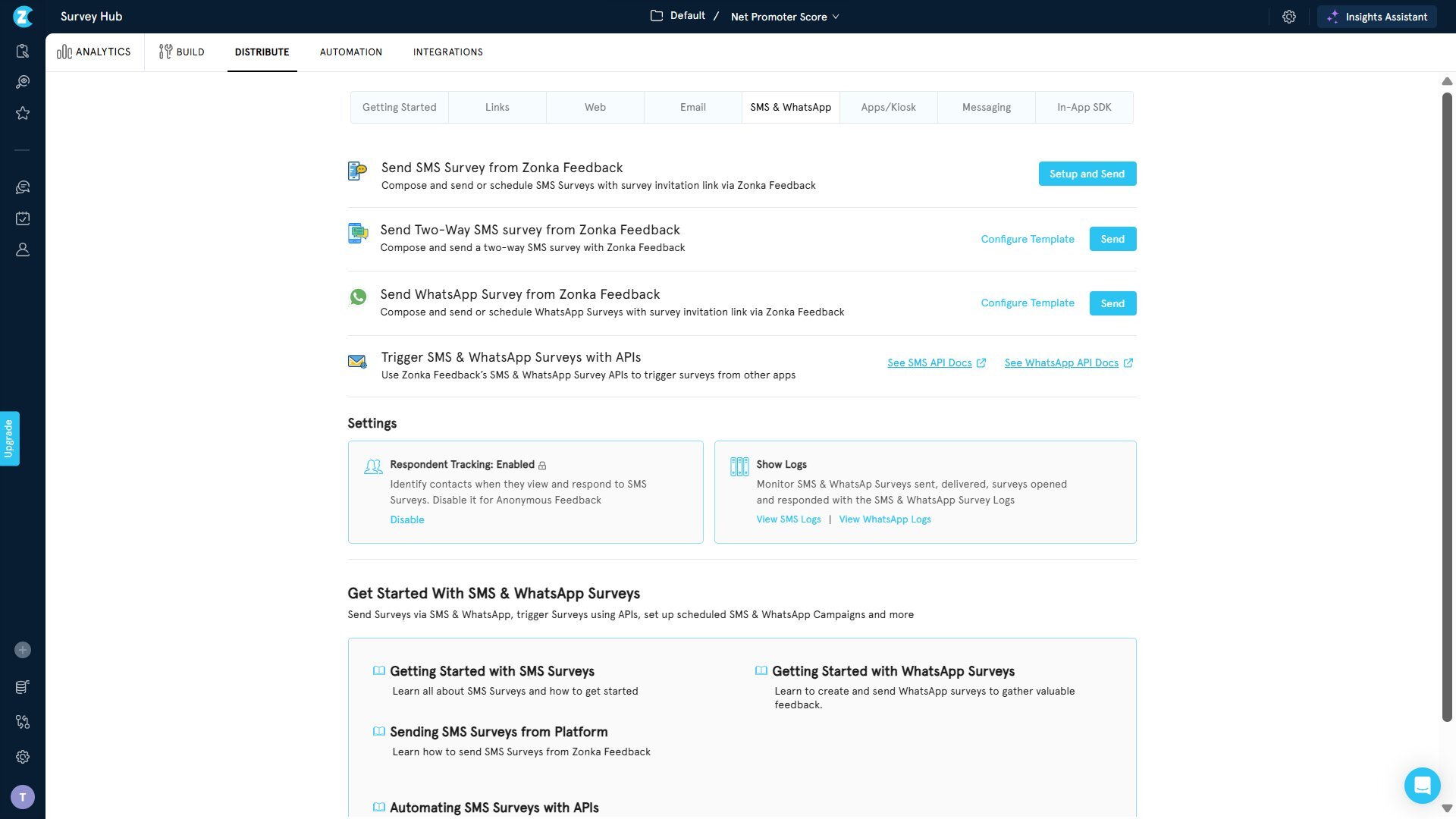
Inside the Distribute tab, click into the SMS & WhatsApp sub-tab. You'll see a few options. The one you want is Send Two-Way SMS survey from Zonka Feedback.
Click Configure Template to set up the conversation, or Send if your template is already configured.
Step 7: Configure the conversation and use the live preview
This is where you shape the back-and-forth the customer will experience in the thread. The Compose Two-Way SMS Survey screen lays out the full conversation: the Welcome Message, each question in order, the Exit Message, and a Global Retry Message. On the right, a phone preview shows you exactly what the conversation will look like.
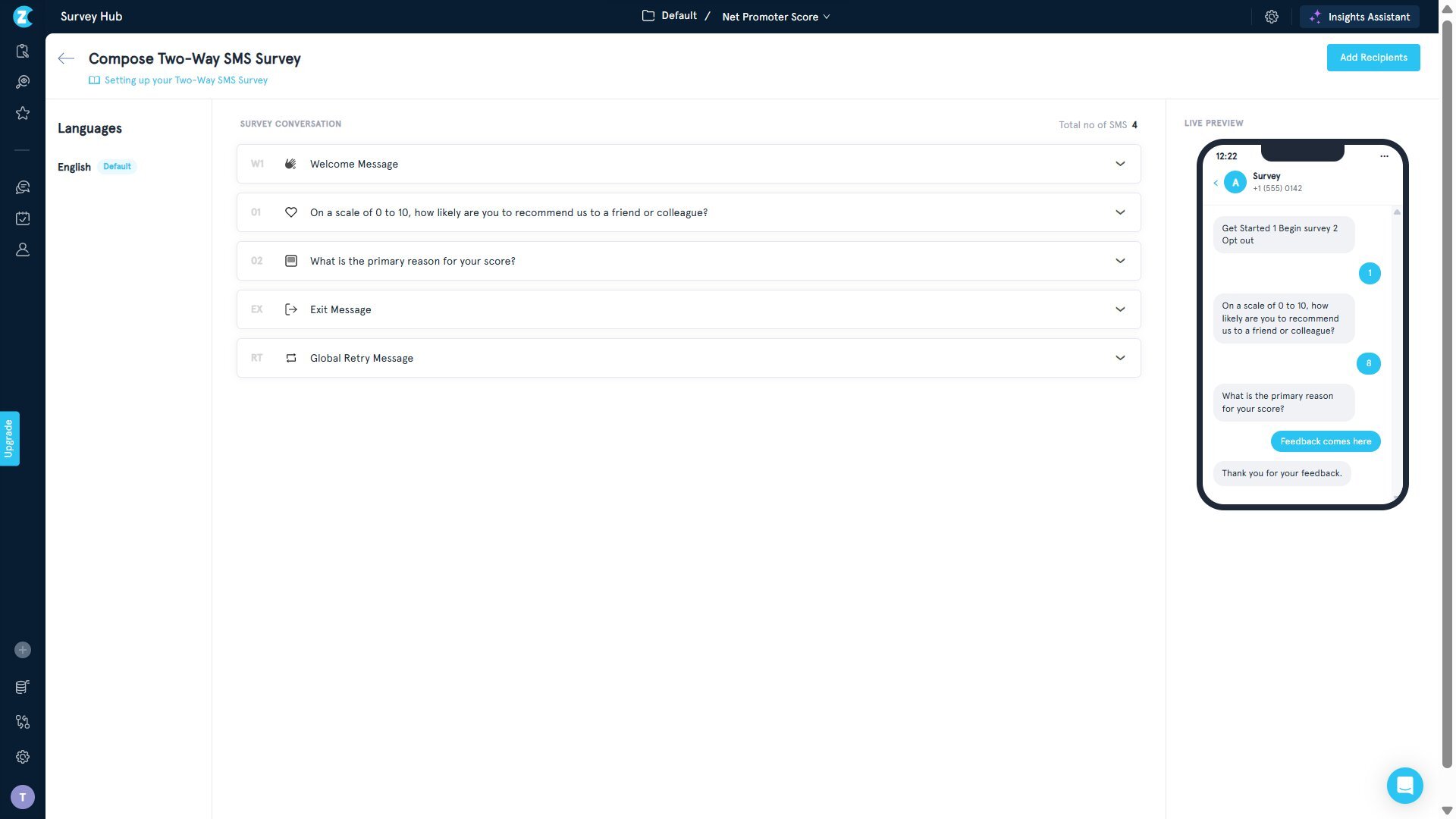
Click any item to expand and edit it. Each message has an SMS Version field where you write what the customer actually receives, a character count to keep you within SMS limits, and Reply Options that map customer replies to choices in your survey.
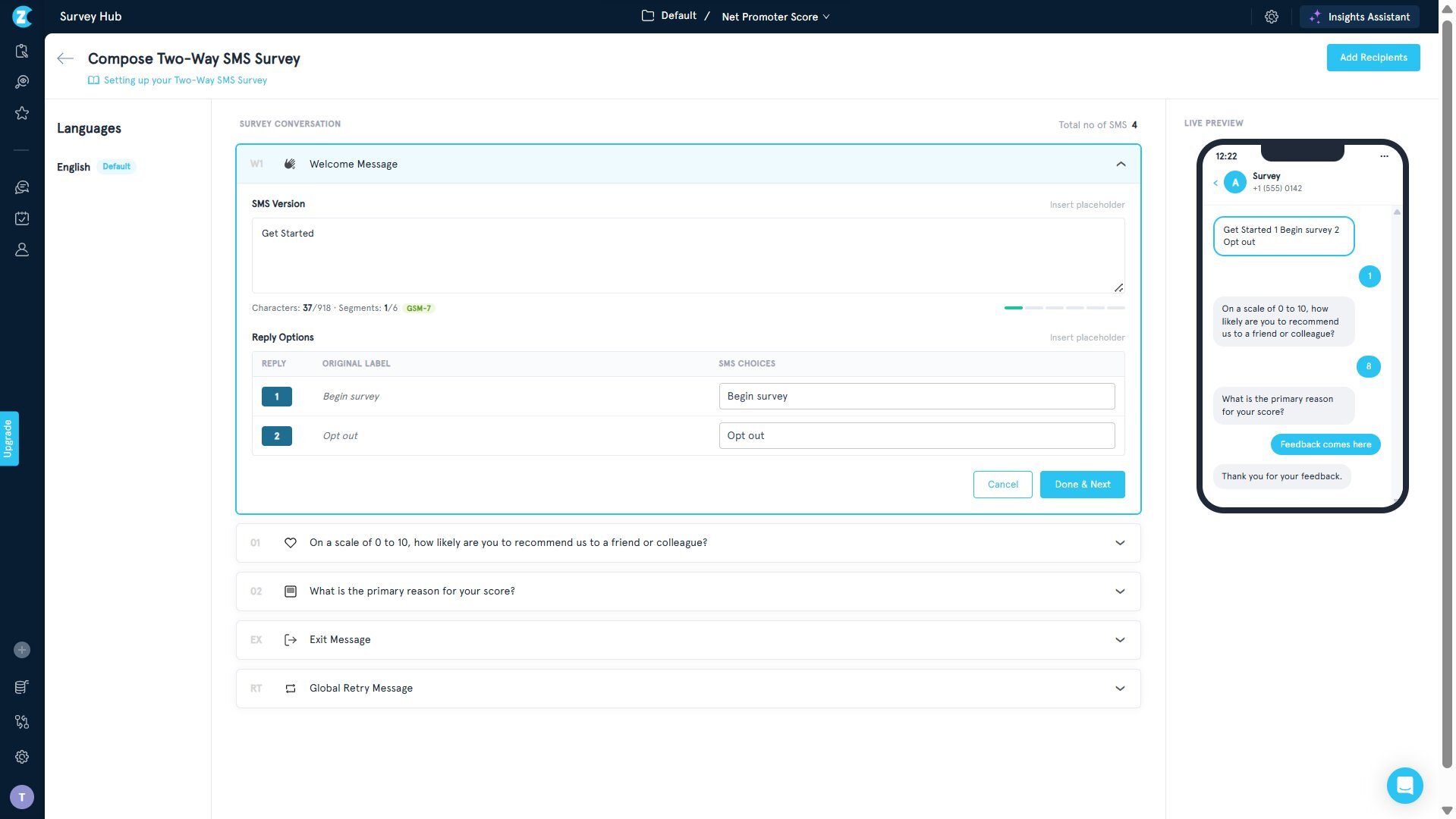
A few things worth setting up here:
- The welcome message lands first and sets expectations. Keep it short. Something like "Got a minute? Two quick questions" works.
- The question itself is what the customer sees. Make it answerable with a number or a single word.
- The exit message is what closes the loop. A thank-you, or a simple acknowledgment.
- The retry message catches replies that don't match the expected format (a word instead of a number, for example) and nudges the customer back without breaking the conversation.
Read the live preview top to bottom before you save. It's the fastest way to catch awkward phrasing or a confusing prompt before the survey goes out.
If you want to make substantial changes to the question itself, go back to the survey editor. The configuration screen is mainly for adjusting the conversation framing.
Step 8: Add recipients
Once the survey's built and the conversation's configured, click Add Recipients in the top-right. You've got three ways to do this:
- Add contacts manually, one at a time.
- Choose a segment you've already built (for example, everyone who visited this week, or all customers who completed a support ticket).
- Import a CSV for bulk distribution.
If you're sending to a large, well-defined group, a segment is the easiest path.
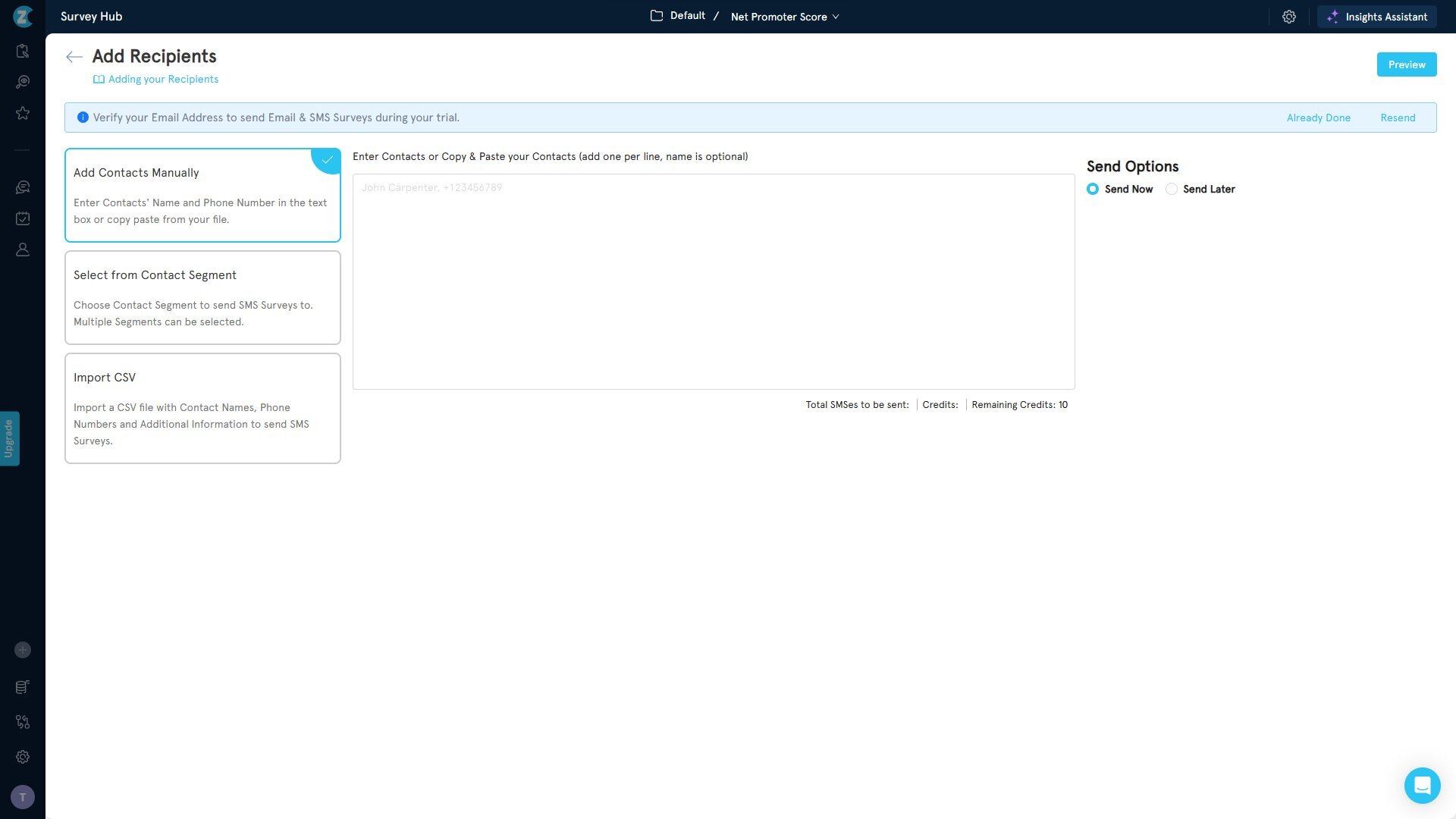
Step 9: Send now or schedule
On the right side of the recipients screen, choose Send Now to send the survey immediately, or Send Later to schedule it for a specific date and time. Sending right after the customer interaction (post-purchase, post-call, post-visit) tends to get the best response rate because the experience is still fresh.
Click Preview for one final check, then Send. The survey's now on its way.
Designing Effective Two-Way SMS Survey Questions
The channel handles a lot of the heavy lifting. But the survey still has to be written well, and SMS has its own rules.
Keep each question short. SMS is a short-form channel. A question that runs to three lines starts to feel like work. Aim for one clear sentence. If you can ask it in under twenty words, do.
Ask one thing at a time. Don't stack questions in a single message. Each message should ask one thing, and each reply should answer one thing. That rhythm is what keeps the conversation moving.
Start with the easiest question. Lead with a single-number reply (NPS, CSAT, yes/no). It takes one tap, and once the customer's replied once, they're far more likely to reply again. A long open-ended question as the first message will lose people before the survey starts.
Use open-ended questions sparingly, and always as follow-ups. Two-way SMS is one of the few channels where open-ended questions actually work, because typing is the default behavior. But save them for after a score, when you can ask a targeted "why?" Don't lead with them.
Set expectations up front. A short opening message that says "Got a minute? Two quick questions" tells the customer what they're in for. That transparency raises completion.
Always include an opt-out. Compliance and trust both depend on it. Make it obvious.
Best Practices for Two-Way SMS Surveys
The channel does a lot of the work, but the surveys that get answered are the ones run with intention. The difference between a 20% response rate and a 60% response rate isn't the technology. It's the small decisions you make about when to send, how to phrase the opening, and what you do with the reply. These are the habits that separate the two.
1. Send at the moment of experience
The closer you are to the interaction (the purchase, the visit, the support call), the higher the response rate. Recall fades fast, and so does emotional intensity. A survey sent within five minutes of a checkout gets a different answer than the same survey sent the next morning, and a very different one than the same survey sent three days later. For two-way SMS specifically, the moment-of-experience send is what makes the channel pay off. Customers reply because the experience is still in their head, not because they're trying to remember it.
2. Mind the time of day
Avoid late nights and very early mornings. The respect of not buzzing someone's phone at 11 p.m. is its own form of brand-building, and the practical upside is that messages sent during waking hours get answered at much higher rates. Mid-morning and early evening tend to be the strongest windows in most markets. If you're sending across time zones, schedule by the recipient's local time, not yours.
3. Personalize the opening
Use the customer's name. Reference the specific interaction ("Thanks for visiting [store name] today" or "Hope your appointment with Dr. Lee went well"). The difference between a generic "Hi, how was your visit?" and a personalized one is the difference between a mass blast and a one-to-one conversation. Two-way SMS already feels personal because it lives in the same thread as messages from friends and family. Personalization compounds that.
4. Keep it short, and tell them how short
Open with the length. A line like "Got a minute? Two quick questions" sets the contract before they decide whether to engage. Customers are far more willing to start something when they know where it ends. Vague openings like "We'd love your feedback" leave them guessing at the commitment, and guessing usually ends with the phone going back in the pocket.
5. Don't over-survey
Build user segmentation and throttling rules so the same customer doesn't get hit with feedback requests every week. The fastest way to train customers to opt out is to ask them too often. A good rule of thumb: no more than one survey per customer per 30 days, with a longer cooldown after they've already responded recently. Survey fatigue is real, and it's worse on SMS than on email because the channel feels more intrusive when it's overused.
6. Always include an opt-out
Compliance and trust both depend on it. Make it obvious in the welcome message, not buried in the fine print. A customer who can clearly see the exit door is more likely to walk through the front one. The legal requirements (TCPA in the US, GDPR in Europe) make this mandatory, but the trust argument matters more in the long run. People remember which brands let them leave easily.
7. Respond when they reply
Especially if it's a low score. The whole point of running the survey in a conversational channel is that you can keep the conversation going. A simple acknowledgment, or a real follow-up question from a human, turns a detractor moment into a recovery moment. The customer who rates you a 3 and gets a thoughtful reply within five minutes is a customer who often becomes a 7 by the end of the week. The one who gets silence becomes a 1-star review.
8. Use the open-ended follow-up well
If your survey has an open-ended question (and for two-way SMS, it should), treat the replies as the most valuable data you'll get. The closed-ended score tells you what. The open-ended reply tells you why. Don't let those free-text responses sit unread in an inbox. Categorize them, look for patterns, and use them to inform the changes that fix the why. AI thematic analysis makes this manageable even at scale.
9. Track and act on the data
Connect your survey to a response dashboard, set up automated workflows for low scores, and route alerts to the right team. Feedback you don't act on isn't feedback, it's noise. The goal of running a feedback program is to change something, and that means closing the loop on every response that asks you to. Set the routing rules once, and the workflow runs without your team having to babysit it.
10. Stay compliant
Get explicit opt-in before you send. Honor opt-outs immediately. Know your local rules — the Telephone Consumer Protection Act and 10DLC registration in the US, GDPR in Europe, and whatever applies in your specific market. Compliance isn't a checkbox, it's the price of access to the channel. Get it wrong once and you can lose the ability to send altogether, on top of the fines. Build the consent layer carefully and revisit it whenever the rules change.
How Zonka Feedback Handles Two-Way SMS
A few things make two-way SMS in Zonka Feedback work differently from a general SMS marketing tool.
The survey lives end-to-end in one place. You build the survey, configure the conversation, send it out, and read the responses inside a single platform, no patchwork of separate tools.
The retry message logic catches the inevitable. Customers don't always reply in the format you expect. A retry message nudges them back on track without breaking the conversation, so a single off-format reply doesn't kill the response.
The two-way flow comes pre-wired. You don't need to build the back-and-forth logic yourself. Configure the welcome, the question, the end-screen, and the retry, and the conversation runs.
Compliance is handled. Zonka Feedback manages the regulatory overhead so you can run programs across regions without carrying it yourself.
Responses land alongside the rest of your feedback. SMS responses sit in the same inbox as your email, WhatsApp, in-app, and website feedback. You see the full customer view, not a fragmented one.
And our AI customer feedback analytics means open-ended SMS replies don't pile up as unread free text. Thematic analysis, sentiment, and entity extraction turn hundreds of qualitative replies into insights you can act on.
Conclusion
The reason two-way SMS surveys work is almost embarrassingly simple. They match the way people already use their phones. The question arrives in the place where they already read messages, and the reply happens in the place where they already type. There's nothing new to learn, nothing new to install, no decision to make about whether the link is safe to tap.
For any business that depends on quick, real-time feedback — whether you're running retail customer experience software across stores or hospital feedback software across patient touchpoints — it's the channel that consistently outperforms the rest on response rate, speed, and completion. And in markets where SMS is still the universal layer that reaches every phone, it's not just a nice-to-have. It's the channel.
The setup is straightforward, the best practices are stable, and the upside compounds with every well-timed message.
Schedule a demo to send your first two-way SMS survey today.


.png)
.png)








