.svg)
 Healthcare
 Finance
 Retail
 SaaS & Digital
 eCommerce
 Education
 Salesforce
  HubSpot
 Pipedrive
 Mailchimp
 Klaviyo
 Zendesk
  Intercom
 Freshdesk
 HelpScout
  Front
Front Jira
Jira Slack
Slack  MS Teams
 Zoom
Zoom Google Sheets
  Zapier
  Integrately
 Make
Make  Webhooks



 Sign In
 MS Teams
.png?width=400&height=240&name=How%20to%20Choose%20Enterprise%20Survey%20Tools%20(2).png)

.png)


TL;DR
- Choosing enterprise survey tools means weighing six criteria: requirements fit, core survey capabilities, scale and performance, security and compliance, integrations, and analytics depth. Most buyers over-weight the survey builder and under-weight what happens after a response lands.
- Define your requirements before you look at a single tool. The teams that regret their choice usually bought for a demo instead of a use case.
- Security and compliance is a pass/fail gate, not a feature to weigh. SOC 2 Type II, ISO 27001, and GDPR or HIPAA support where relevant should be table stakes before a tool makes your shortlist.
- The criterion most guides skip is time-to-action, meaning how fast a response becomes something a specific person can act on. A cheaper tool that routes a signal to the right owner often beats an expensive one that leaves a dashboard for someone to check.
- Score every shortlisted vendor on the same checklist and ask each one the same questions. The scorecard tells impressive-looking tools apart better than any sales call.
Every enterprise survey tool looks the same in a demo. Clean builder, a dashboard full of charts, a logo wall of customers bigger than yours. Forty-five minutes later you have three shortlisted vendors and no real way to tell them apart. That's the real difficulty in how to choose enterprise survey tools. The differences that matter don't show up in a scripted walkthrough. They show up six months in, when you're running 40,000 responses a quarter across five business units, and one tool buckles while another quietly routes a churn signal to the right regional manager. What follows is a decision framework, not a tool ranking.
What to Look for in Enterprise Survey Tools
Enterprise survey tools are survey platforms built to run large, governed feedback programs across multiple teams, regions, and channels, with the security, scale, and integrations a single-team tool doesn't need.
Choosing one comes down to six criteria: how well it fits your specific requirements, the depth of its core survey capabilities, how it performs at scale, its security and compliance posture, the integrations it supports, and how far its analytics go past collecting responses. Most buyers rank these in roughly that order and get it wrong. The survey builder is the easiest thing to judge in a demo and the least likely to be your constraint at scale. Security, integrations, and what happens to a response after it lands are harder to see and far more likely to decide whether the tool still works a year from now.
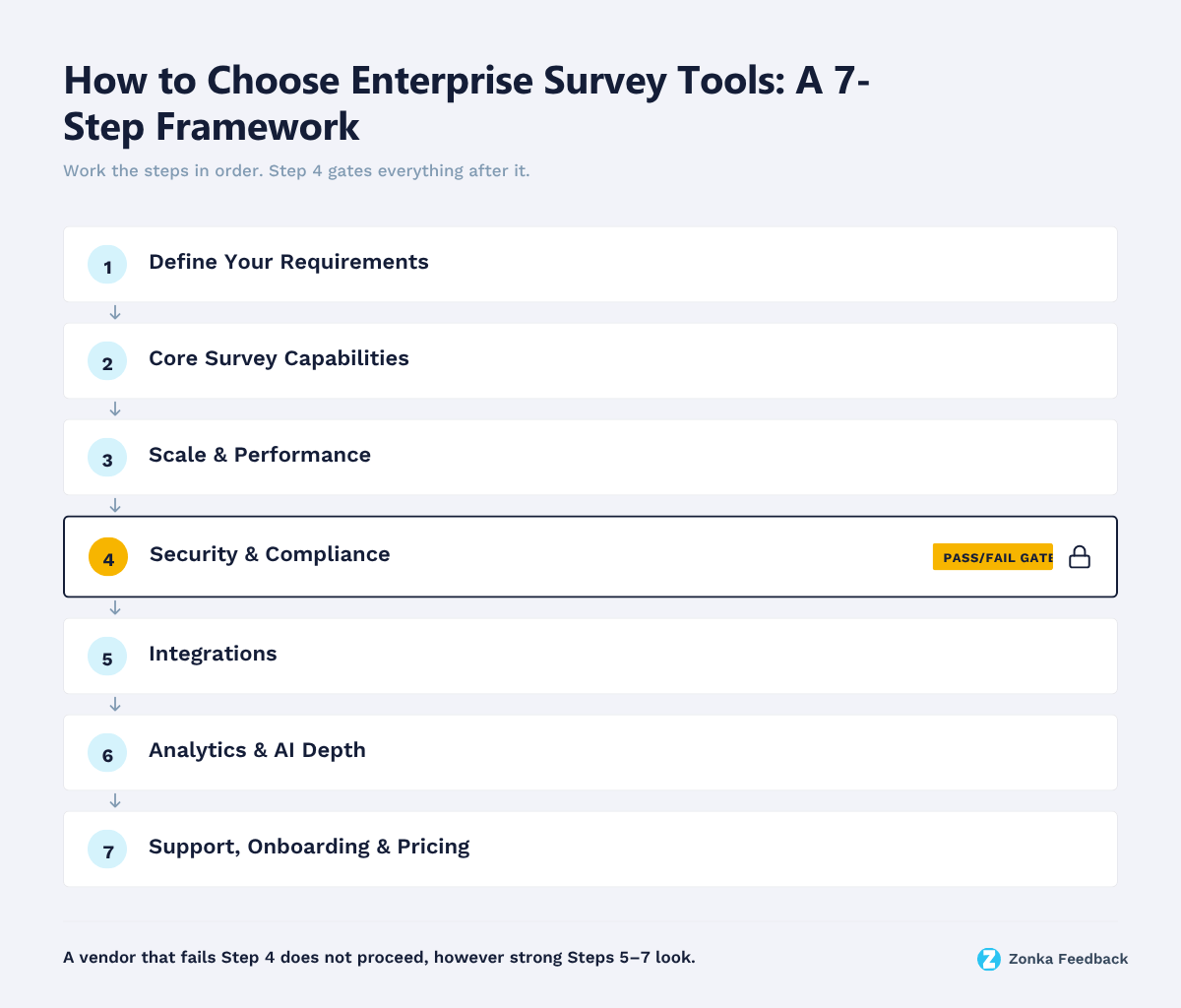
Each criterion below is a step, in the order a real evaluation follows. Requirements first. Tools last.
Step 1: Define Your Requirements
The most expensive mistake happens before you look at a single tool. Buying for a use case you never defined. Write down what you need the platform to do, in specifics.
Four questions do most of the work.
- Which teams will use it? CX, product, HR, customer success, marketing, and research teams all want different things. A CX team runs net promoter score and customer satisfaction programs, HR runs employee engagement surveys and exit surveys, and market research teams run brand research and concept testing. A tool that's great for one can be thin for another.
- What's your real response volume? Not today's number. The volume 18 months out, across every program you plan to run.
- Which channels do you need? Email and web are the floor. SMS, WhatsApp, in-app, offline, and QR each matter to different programs.
- Who owns the data, and who's allowed to see what? This question decides more about tooling than most buyers expect.
If you can't answer these, no shortlist will help. Whether you're running customer feedback or employee feedback programs, the types of enterprise surveys you plan to run, from relationship to transactional to market research, shape almost every later criterion. Map them first.
Step 2: Evaluate Core Survey Capabilities
Core survey capabilities are where most tools look identical and behave differently. Every platform claims advanced logic and multi-channel distribution. The gap shows up in the details.
Four capabilities separate enterprise-grade builders from the rest.
- Question types and logic. Look past the count of survey question types to how advanced survey logic behaves, meaning branching, skip logic, and piping across a long, conditional survey. A real structured questionnaire, not a five-field form. Weak survey logic is where simpler tools quietly break, and where your data quality slips with them.
- Distribution. The tool should send the same survey across email, SMS, WhatsApp, web, in-app, kiosk or tablet, and offline without rebuilding it per channel. Field operations, healthcare, and retail programs live or die on the channels most tools skip.
- Multilingual support. If you operate in more than one region, multilingual surveys with per-language logic and reporting aren't optional.
- Branding control. White-labeled surveys, custom branding, and custom domains matter more at enterprise scale, where the survey represents your brand to thousands of customers.
One test cuts through the demo polish. Ask the vendor to build a 15-question survey with conditional branching, in two languages, during the call. What takes ten minutes in one tool takes a support ticket in another.
The same test exposes the learning curve. The most powerful platforms often need a trained specialist to build anything complex. That depth is exactly right if you're running large academic or statistical research, where a tool like Qualtrics genuinely leads. It's pure overhead if your teams just need to ship good surveys without a certified admin in the loop.
Step 3: Assess Scale and Performance
Scale is the criterion buyers discover too late. A tool that handles 2,000 responses a month can behave very differently at 200,000. Slower dashboards, trouble when you export data, survey sends that queue for hours. Large-sample enterprise research pushes these limits hardest.
Three things to pressure-test.
- Respondent volume and send limits. Ask for the actual ceiling on responses, contacts, and monthly sends on the plan you'd buy, not the theoretical platform maximum.
- Concurrency. Can it collect thousands of simultaneous responses, say a post-event survey to your whole customer base, without dropping data or slowing the respondent experience?
- Multi-workspace structure. Enterprises run many programs across business units. You want separate workspaces with shared governance, so survey data stays organized by unit instead of piling into one account everyone logs into.
Uptime and SLA terms belong here too. A 99.9% SLA with a documented incident history means more than a marketing claim of reliability. Running enterprise surveys at this volume is as much an operations decision as a feature one. Most solid enterprise survey best practices guides cover the distribution and response-handling mechanics.
Step 4: Check Security and Compliance
Security and compliance is a pass/fail gate, not a feature to weigh. Enterprise survey programs collect sensitive data, so enterprise-grade security and real data security controls come before anything on the feature list. If a tool can't meet your requirements here, its survey builder doesn't matter. This is where you disqualify vendors, not rank them.
Start with the certifications that signal an independently audited security program. SOC 2 is the baseline. The AICPA's Trust Services Criteria define it across five categories, security, availability, processing integrity, confidentiality, and privacy, with security required in every audit (source: AICPA). One distinction matters when you read the report. SOC 2 Type I attests that controls were designed properly at a point in time, while Type II attests that they operated effectively over a period, usually 3 to 12 months. Type II is the one that tells you the controls actually work. ISO 27001 is the international equivalent and worth having alongside it.
Certifications tell you the vendor runs a real security program. Regulations tell you whether you can legally use the data.
Where you handle regulated customer data, the specific regime decides the shortlist. GDPR compliance is the common gate. Personal data of EU residents can move outside the EEA only under an adequacy decision or a safeguard like Standard Contractual Clauses, and the penalties aren't theoretical. They reach up to €20 million or 4% of global annual turnover for the most serious violations, including transfer breaches (source: GDPR Article 83). That makes data residency, the ability to host responses in a specific region, a hard requirement for many EU programs. For healthcare, you need a vendor that will sign a BAA and support the workflow. HIPAA-compliant survey tools are a narrower set than general enterprise platforms.
Then there's access control. These enterprise controls are where enterprise and mid-market tools genuinely diverge.
- SSO via SAML or OIDC, so access follows your identity provider.
- SCIM provisioning, so joiners and leavers sync automatically instead of by hand.
- Role-based access control (RBAC), so a regional manager sees their data and not the whole org's.
- Audit logs, so you can prove who accessed or changed what.
For a full checklist of what to verify here, our guide to enterprise survey security and compliance goes deeper than one step can.
Step 5: Review Integrations
Integrations decide whether survey data lives in a silo or in your workflow. An enterprise survey tool that can't push responses into the existing tools and processes your teams already use creates a second problem for every one it solves.
Map integrations to where the data needs to go.
- CRM. Responses should map to the contact, account, or case in Salesforce or HubSpot, so a rep sees satisfaction history in context, not in a separate tool.
- Helpdesk and collaboration. Post-ticket CSAT or CES should flow back into Zendesk or your support platform, push alerts to Slack or Microsoft Teams, and trigger workflow automation that follows up on low scores.
- BI and data warehouse. Raw response data should export to your BI stack for teams that model it alongside revenue and product data.
- Identity. SSO and SCIM, covered in the security step, are integrations too.
Two questions separate real integrations from checkbox ones. Is it native or does it need a middleware tool, and does it sync both directions? A one-way export to a spreadsheet is not an integration. For the full picture of what to connect and how, see our guide to enterprise survey integrations.
Step 6: Weigh Analytics and AI Depth
Here's the criterion most buyer's guides skip, and it's the one that separates a tool you tolerate from one your teams actually use. How fast a response becomes something a specific person can act on.
Modern enterprise survey platforms all advertise analytics now. Charts, filters, exports, an AI summary button. The question isn't whether a tool has analytics. It's how far the analytics go before a human has to take over.
There are roughly three levels, and knowing which one you're buying matters more than the feature list.
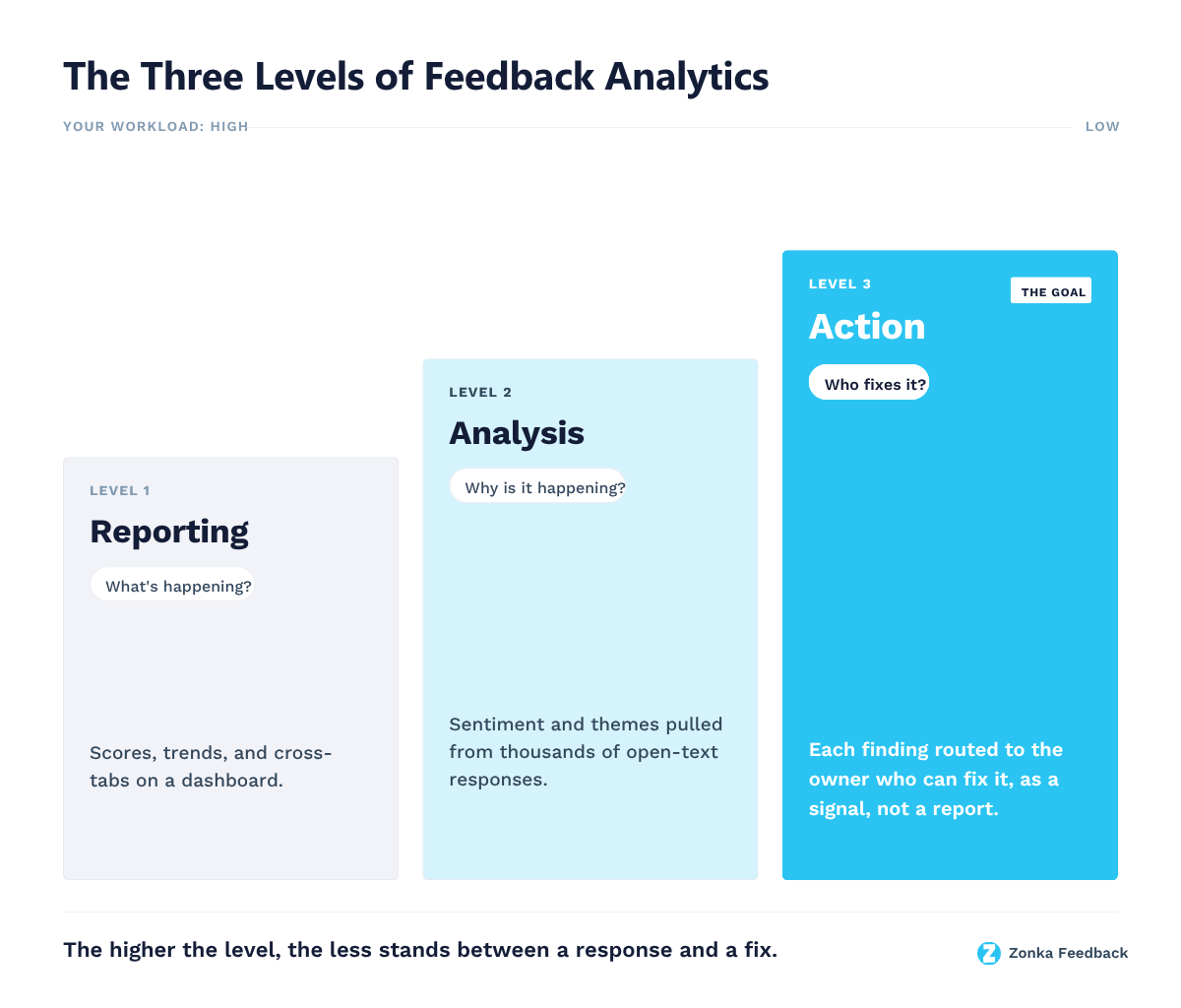
Level one is reporting. The tool shows you scores, trends, cross-tabs, and advanced reporting. You still do the interpretation. Most survey tools stop here.
Level two is analysis. The tool reads open-ended responses for you, using sentiment analysis to score tone and thematic analysis to cluster what people are talking about, so you're not hand-coding thousands of comments. That deeper analysis is a real jump, and it's where "AI-powered" usually points. Plenty of analytics platforms stop right here and call it advanced analytics.
Level three is where feedback becomes action. The system doesn't just cluster themes. It maps each comment to the part of your business it's about, a location, an agent, a product area, watches for changes, and routes the finding to the person who owns it. It also reads across sources, so survey responses, reviews, and support tickets get analyzed together instead of sitting in three separate tools. A survey tool gives you a number. A feedback intelligence platform gives you a signal. Your Chicago branch dropped 12 points this week, here's what's driving it, and the regional manager already has it.
That gap is the real decision. Every tool can collect feedback. A cheaper one that turns it into an owned action often beats an expensive one that leaves a dashboard for someone to check. After a bad response, how many steps until the right person knows and can act? Count them. Fewer is the whole point.
Plenty of tools handle levels one and two well. The ones worth shortlisting get you to level three without a services engagement to wire it up. That's the bar for this criterion. Hold every vendor to it.
Step 7: Compare Support, Onboarding and Pricing Models
Support, onboarding, and pricing are where two tools with identical feature lists become very different purchases. Think of this as the total-cost-of-ownership step.
Pricing models matter more than the sticker number, because they decide how cost scales with you.
- Response-based pricing charges by volume of responses collected. Predictable if your volume is steady, punishing if you run occasional large campaigns.
- Seat or user-based pricing charges by people with access. Fine for small teams, expensive when you want the whole org to see their own data.
- Custom or hybrid pricing is standard at the enterprise tier, where volume, workspaces, and support get negotiated together.
Watch the headline claims too. A free plan or unlimited responses usually hides limits that surface exactly where enterprise programs live, on users, logic, exports, or data retention. At the other end, the enterprise giants carry five- and six-figure annual contracts, with pricing that isn't public and add-ons billed separately. Sometimes that's justified. Often it's overhead a leaner tool doesn't charge for. Most enterprise vendors use custom pricing at this level rather than a public per-seat rate, so budget by total cost of ownership. Licensing, implementation, and the internal time to run it.
Onboarding is the other hidden cost, and it varies more than any spec sheet shows. Ask how long implementation actually takes and what it requires from your team. The heavyweight platforms are the cautionary example. Independent reviews put a full enterprise VoC rollout on Qualtrics at three to six months, and it typically needs a dedicated implementation engagement plus an internal program owner to run it (source: RevOps.tools). Lighter enterprise tools get a first program live in days, with no services contract standing between you and the value you already paid for. Faster time-to-value isn't a nice-to-have. It's the difference between proving the program this quarter and defending the budget next year.
Also check the support you get at your tier, whether that's dedicated support with a named contact and a real SLA, or a shared inbox. When something breaks during a live program, the difference isn't academic.
Build vs Buy: When Each Makes Sense
Occasionally the right answer isn't a vendor at all. Some enterprises consider building survey infrastructure in-house, and it's worth being honest about when that makes sense.
Building makes sense in a narrow set of cases. You have unusual requirements no vendor meets, a dedicated engineering team to own it long-term, and enough volume that per-response pricing would dwarf the build cost. That's a real scenario for a handful of very large organizations.
Buying makes sense for almost everyone else. The reason is maintenance, not construction. A survey tool isn't a one-time build. It's compliance updates, channel APIs that change, deliverability, uptime, and analytics that all need constant work. Most teams that build underestimate the second year.
Here's the honest test. Would you build your own CRM? If not, the same logic usually applies. The build vs buy for enterprise survey platforms decision comes down to whether surveys are core to what you sell or a capability you need to run the business. For nearly all teams, it's the latter.
Enterprise Survey Tools Evaluation Checklist
Use this checklist to score enterprise survey tools the same way, on the same criteria, for every vendor on your shortlist. Rate each row pass or fail first. A fail on security or compliance ends the evaluation regardless of everything else. Then score the passes 1 to 5 and compare totals.
| Criterion | What good looks like | Red flag | Question to ask the vendor |
| Requirements fit | Handles your specific use cases, teams, and channels | Built for one team, thin for the others | "Show me this exact use case, not a generic demo." |
| Survey capabilities | Complex logic, piping, every channel you need, multilingual, buildable without a specialist | Logic breaks on long surveys, or every change needs a trained admin | "Build a 15-question, two-language branching survey now." |
| Scale and performance | Documented ceilings, real concurrency, multi-workspace | Vague on limits, one shared account for everyone | "What's the actual send and response ceiling on our plan?" |
| Security and compliance | SOC 2 Type II, ISO 27001, GDPR/HIPAA as needed, SSO, SCIM, RBAC, audit logs, data residency | Only SOC 2 Type I, or "in progress" | "Send your latest SOC 2 Type II report and subprocessor list." |
| Integrations | Native, two-way sync to CRM, helpdesk, BI, and identity | Middleware-only, or one-way export | "Is the CRM sync native and bidirectional?" |
| Analytics and AI depth | Sentiment and thematic analysis that routes findings to owners, across surveys, reviews, and tickets | Dashboards only, you do all the interpretation | "After a bad response, how many steps until the owner acts?" |
| Support, onboarding, pricing | Live in days, dedicated support, real SLA, pricing that scales predictably | Multi-month rollout, mandatory services engagement, opaque contract | "What's total first-year cost, including implementation?" |
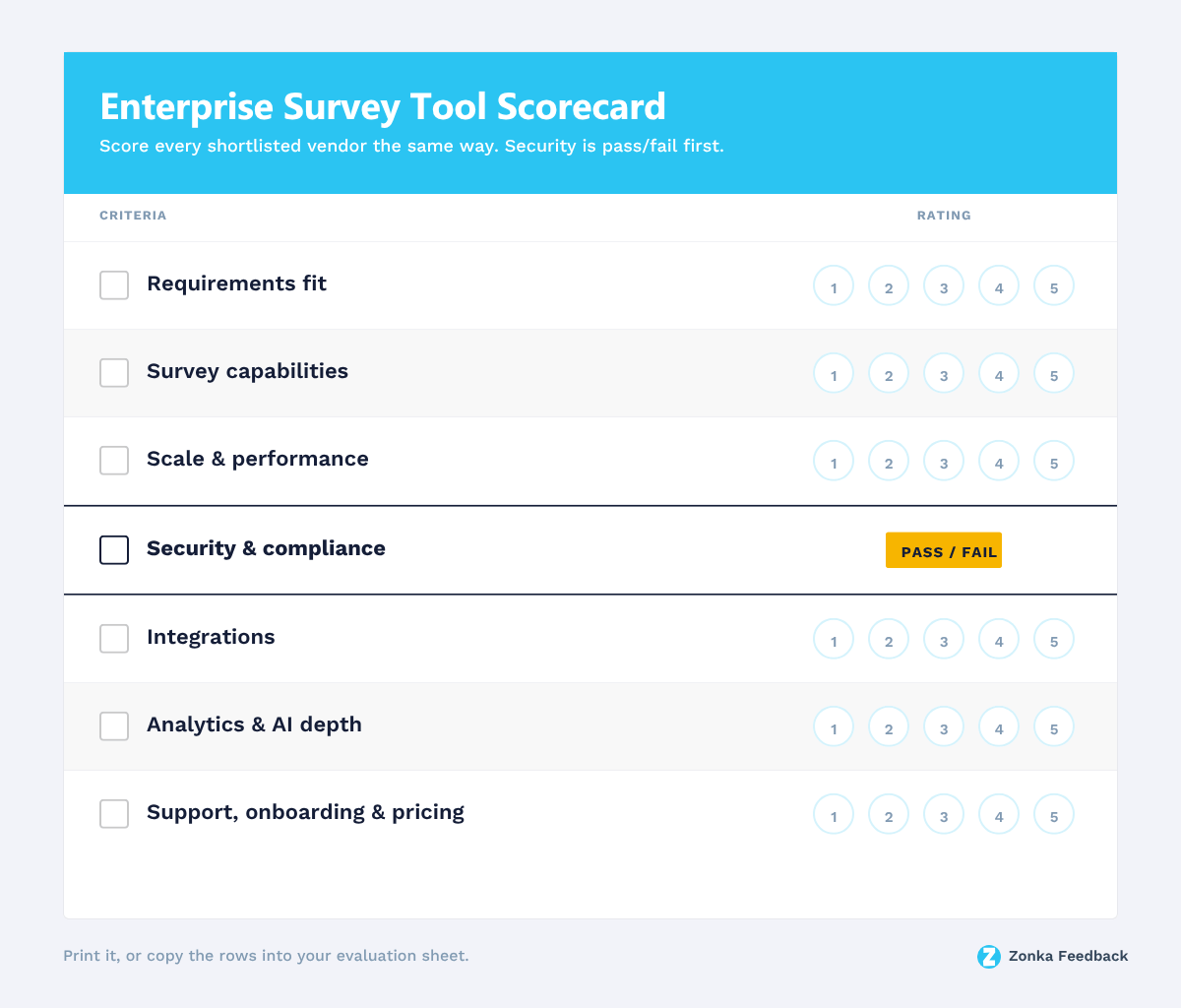
Score every shortlisted tool on this grid before any pricing conversation. The vendor that wins isn't the one with the most 5s across the board. It's the one that clears the pass/fail gates and scores highest on the two or three criteria that map to your actual constraints. When two tools tie, the tiebreaker is almost always analytics depth and time-to-action, because that's the criterion you'll feel every week.
Where to Start Your Shortlist
This guide is deliberately a framework, not a ranking. Naming a shortlist here would duplicate work we've already done in depth. Once you've mapped your requirements and know which criteria are your real constraints, the next move is to run actual tools through the checklist above. For a current shortlist of enterprise survey tools evaluated against these kinds of criteria, start there, then bring the two or three that fit into a scored evaluation.
The One Hour That Decides This
Before you book a single demo, write your requirements down and turn the checklist above into a scorecard. That one hour of work tells you more than five sales calls, because it forces you to evaluate tools against your program instead of their pitch. The tools will all look impressive. The scorecard is what tells them apart.
And once you're down to two or three, run a short proof-of-concept on your own data, not the demo dataset the vendor hands you. Pull security and procurement in at that stage rather than after you've chosen, so the people who can veto the deal help shape it instead of blocking it at signing.
A quick disclosure. This guide comes from the team behind Zonka Feedback, an AI Customer Feedback & Intelligence Platform. We've kept the framework vendor-neutral, so judge it on whether it helps you decide. When you're ready to put a platform against this checklist, our enterprise survey software page is a good place to start.


.png)
.png)
.png)
.png)