.svg)
 Healthcare
 Finance
 Retail
 SaaS & Digital
 eCommerce
 Education
 Salesforce
  HubSpot
 Pipedrive
 Mailchimp
 Klaviyo
 Zendesk
  Intercom
 Freshdesk
 HelpScout
  Front
Front Jira
Jira Slack
Slack  MS Teams
 Zoom
Zoom Google Sheets
  Zapier
  Integrately
 Make
Make  Webhooks




 MS Teams
%20Emails_%20Tips%20%26%20Examples%20for%20Measuring%20Customer%20Loyalty.svg)


TL;DR
-
NPS email delivery determines response rates more than survey design. Send at the wrong time or to the wrong people and your data will be skewed.
-
Transactional NPS should be sent immediately after specific events (purchase, support ticket, feature use). Relational NPS should be sent quarterly for B2B or semi-annually for B2C.
-
Best delivery window: Tuesday-Thursday, 9-11 AM in the recipient's local time zone. Avoid Mondays, Fridays, and weekends.
-
Never survey the same customer more than once every 90 days. Survey fatigue tanks response rates and creates negative brand associations.
-
60% of NPS emails are opened on mobile. If your survey isn't mobile-optimized, you're losing half your potential responses.
Most companies send NPS surveys at the wrong time, to the wrong people, and wonder why their response rates are terrible.
Here's what happens. You craft the perfect survey. You personalize the subject line. You spend hours on the email copy. Then you hit send on a Monday morning to every customer in your database, and 12% of them actually open it. Of those, maybe half respond. You end up with skewed data, missed detractors who never opened your email to begin with, and a lingering sense that something about this process is fundamentally broken.
The problem isn't your survey. It's your delivery.
Sending an NPS email isn't just about asking the question. It's about when you send it, how you send it, who gets it, and which channel carries it. Get those mechanics wrong, and even your most loyal customers won't respond. Get them right, and you unlock response rates that actually give you clean, actionable data.
This guide is about the delivery side. Not what to write in the follow-up email after someone responds (we cover that in our guide to NPS follow-up emails). This is about getting your NPS survey into the right inbox at the right moment in a format that makes responding feel effortless.
We're going to walk through delivery methods, timing strategies, frequency rules, mobile optimization, and the technical details that separate high-performing NPS programs from the ones collecting biased data. By the end, you'll know exactly how to send NPS emails that people actually want to answer.
Understanding NPS Email Types: Transactional vs. Relational
Before you send a single email, you need to know which type of NPS survey you're running. The two types have completely different delivery rules. For a full breakdown of when to use each survey type, see our guide on transactional vs. relational NPS.
Transactional NPS measures satisfaction after a specific event (purchase, support ticket, feature update), while relational NPS measures overall brand loyalty over time. The difference matters for delivery because transactional NPS is event-triggered and relational NPS is time-triggered.
Here's what that means for email delivery timing:
Timing for transactional NPS:
- Post-purchase: 1-2 days after delivery (not on order confirmation, that's too early)
- Post-support: Within 24 hours of ticket resolution
- Feature adoption: Right after the customer completes a meaningful action (trial conversion, onboarding milestone, first campaign sent)
Relational NPS measures overall loyalty to your brand, not a single interaction. It's your quarterly or semi-annual pulse check. These surveys track how the relationship is evolving over time, which means they need to land at strategic moments, not random ones.
Timing for relational NPS:
- Frequency: Quarterly for B2B SaaS, semi-annually for B2C
- Strategic windows: Before quarterly reviews (so you have data to discuss), 2-3 months before renewal (so you can course-correct), after onboarding is complete but before the first renewal cycle
Transactional emails are automated based on customer actions in your CRM or product. Relational emails run on a calendar schedule, but you still need to respect time zones, avoid over-surveying, and segment by engagement level.
Understanding how to calculate NPS helps, but knowing when and how to send the survey determines whether that calculation is even worth doing.
Email Delivery Methods That Actually Work
There are four ways to deliver an NPS survey via email. Each works best in different scenarios.
1. Direct Embed (NPS Question Visible in Email Body)
The NPS question appears directly in the email. No link. No new tab. The customer sees the 0-10 rating scale right there in their inbox and clicks their score. This is the highest-converting method because it removes friction.
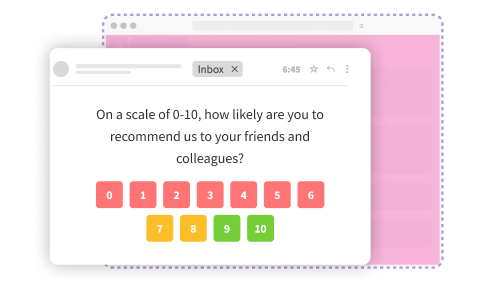
When to use it:
- Single-question surveys (just the NPS question, no follow-ups)
- Transactional NPS where you want immediate feedback
- Mobile-heavy audiences (one tap to respond)
Limitation: If you want to ask a follow-up question after they select a score, they'll be redirected to a landing page for that part. The first click (the NPS score itself) happens in-email.
2. Survey Link or Button
The email contains a button or link that opens the survey in a new tab or window. The full survey (NPS question plus any follow-ups) lives on a landing page.
When to use it:
- Multi-question surveys
- When you need more complex logic (e.g., different follow-up questions for promoters vs. detractors)
- When you want full branding control on the survey page itself
Limitation: Extra click = slightly lower response rate compared to direct embed. Still effective, just not quite as frictionless.
3. Email Signature Survey
The NPS question sits in your team's email signatures. Every email your support, sales, or account team sends has a small, unobtrusive survey link at the bottom. This is continuous passive feedback collection.
When to use it:
- Ongoing relationship monitoring without formal survey campaigns
- Teams with high email volume (support, customer success)
- When you want feedback without interrupting the primary conversation
Limitation: Response rates are lower because it's not the focus of the email. But over time, you collect a steady stream of unsolicited feedback.
4. Hybrid (First Question Embedded, Rest on Landing Page)
The NPS rating scale appears in the email. When the customer clicks their score, a new page opens with a follow-up question ("What's the main reason for your score?"). This combines the high conversion of direct embed with the flexibility of multi-question surveys.
When to use it:
- When you want both the NPS score and qualitative feedback
- When you need to keep the email short but still ask follow-ups
- When you're testing whether adding a follow-up question tanks response rates (it usually doesn't if the first question is embedded)
Limitation: Requires more technical setup than a simple link. Not all email platforms support embedded interactivity.
For most teams, direct embed or hybrid works best. Simple survey link is fine for complex surveys. Email signature is a background tactic, not your primary method.
When setting up your NPS survey questions, delivery method should be decided alongside question design, not as an afterthought.
When to Send NPS Surveys Emails: Day, Time, and Frequency
Timing determines whether your email gets opened. And whether the person opening it is in the right headspace to give you honest feedback.
Best Day and Time to Send
Research from multiple sources like SurveyMonkey and Delighted all point to the same window: Tuesday through Thursday, 9-11 AM in the recipient's local time zone.
Why this window works:
- Monday: Inboxes are overloaded. Your survey drowns in weekend backlog.
- Tuesday-Thursday: People have cleared urgent emails and settled into their workday. They're more open to non-urgent requests like surveys.
- Friday: End-of-week mode. People are wrapping up, not starting new tasks.
- Weekends: Terrible for B2B. Acceptable for consumer brands, but still lower response rates than weekdays.
Time of day matters too. Mid-morning (9-11 AM) consistently outperforms afternoon sends. By then, people have checked email, dealt with urgent items, and are in a productive rhythm. Late afternoon (4-6 PM) sees decent open rates but lower completion rates because people are wrapping up for the day.
Time zone intelligence is critical. If you send at 10 AM Pacific to your entire customer base, your East Coast customers are getting it at 1 PM (post-lunch lull) and your international customers are getting it at completely random times. You want 10 AM in their time zone, which means you need a system that schedules sends based on recipient location, not your location.
Transactional NPS Frequency Rules
For event-triggered surveys, the rule is simple: send immediately after the event, but never survey the same person more than once every 90 days.
Why 90 days? Survey fatigue. If you send a post-purchase NPS survey, then a post-support NPS survey two weeks later, then a feature-usage NPS survey a week after that, your customer starts ignoring you. Worse, they start associating your brand with survey spam.
The solution is throttling. Your NPS system should track when each customer was last surveyed and suppress any automated triggers that would fall inside the 90-day window. If a customer buys something 30 days after completing a support survey, they don't get the post-purchase survey. They're still inside the suppression window.
Exception: If you're running both transactional and relational NPS, count them separately. A quarterly relational NPS survey doesn't reset the throttle for transactional surveys (and vice versa). But each type should respect its own frequency cap.
Relational NPS Frequency Rules
For scheduled loyalty surveys, quarterly is the standard for B2B SaaS. Semi-annually works for B2C or slower-moving industries. More than quarterly risks fatigue. Less than semi-annually and you lose the ability to track trends.
Strategic timing within that cadence:
- Before quarterly business reviews: Gives you fresh data to bring into the conversation
- 2-3 months before renewal: Early warning system for churn risk
- After major product updates: Captures sentiment while the change is still recent
Avoid sending relational NPS during:
- Peak usage periods (tax season for accounting software, holiday shopping for retail)
- Major industry events (conferences, product launches)
- End of fiscal quarters when your customers are buried in their own reporting
If you're measuring employee NPS alongside customer NPS, the same frequency rules apply. Don't over-survey your internal teams either.
Subject Lines That Get Opened
Your subject line determines whether the email gets opened. Here's what works.
-
Keep it short. Under 40 characters. 60% of emails are opened on mobile, and long subject lines get cut off. "Quick feedback on your recent order" works. "We'd love to hear your thoughts about your recent experience with our customer support team" does not.
-
Personalize when possible. Including the recipient's first name increases open rates, but only if it doesn't sound robotic. "Sarah, how did we do?" feels personal. "Sarah, we value your feedback" feels like a mail merge.
-
Create subtle urgency. Not alarm-style urgency ("Respond NOW!"), but clarity about timing. "30-second survey (expires in 3 days)" sets expectations. "Your feedback matters" does not.
-
Ask a question. Questions naturally prompt a mental response, which makes people more likely to click. "How was your experience?" outperforms "We value your feedback."
-
Test different angles. Subject lines are perfect for A/B testing because you can measure open rates directly. Test 2-3 variations, let them run for a few hundred sends, then use the winner for the rest of the campaign.
10 Subject Line Examples That Work
Consider these subject lines while creating your NPS survey emails:
- "Quick question about your recent order"
- "How did we do? (30 seconds)"
- "Your opinion on [Product Name]"
- "Help us improve your experience"
- "One question for you, [First Name]"
- "Rate your experience (1-10)"
- "We'd love your honest feedback"
- "How likely are you to recommend us?"
- "Your thoughts on our service?"
- "Quick survey (closes Friday)"
Avoid anything that sounds promotional ("Exclusive offer inside!"), vague ("Important update"), or corporate ("Customer Satisfaction Initiative Q4 2026").
When writing NPS survey email templates, subject lines should match the tone and length of the email body. If your email is warm and conversational, your subject line should be too.
Optimizing for Mobile: 60% of Opens Happen Here
Most NPS survey emails get opened on a phone. If your email or survey isn't mobile-friendly, you're losing more than half your potential responses.
What Mobile Optimization Actually Means
-
Responsive design: The email layout automatically adapts to screen size. Text reflows. Buttons scale up. Images resize. This is table stakes, not a nice-to-have.
-
Large touch targets: The 0-10 rating buttons need to be at least 44x44 pixels. Smaller than that and people mis-tap, especially on older phones or for users with accessibility needs. Frustration = abandoned survey.
-
Minimal scrolling; If the NPS question appears below the fold on mobile, response rates drop. The question should be visible the moment someone opens the email, without scrolling.
-
Fast load times: Heavy images or complex HTML can cause emails to render slowly on mobile connections. Keep emails lightweight. Use optimized images. Avoid embedded videos.
-
Test on actual devices: Don't just check the mobile preview in your email builder. Send test emails to yourself and open them on iOS Mail, Gmail app, Outlook mobile. Rendering varies by client, and you'll catch issues that the preview missed.
Mobile-Specific Best Practices
- Use a single-column layout (multi-column layouts break on small screens)
- Keep paragraphs short (2-3 sentences max)
- Use 14pt font minimum for body text
- Make the primary CTA button at least 44 pixels tall
- Front-load the NPS question (don't bury it after three paragraphs of context)
If you're embedding the survey question directly in the email, mobile optimization is even more critical because the entire interaction happens in-email. There's no landing page to fall back on.
Most NPS tools automatically handle mobile optimization, but you should still test. Especially if you're customizing the email template with your own HTML.
Pre-Notification and Reminder Strategies
A single survey email isn't enough. High-performing NPS programs use multi-step sequences.
Pre-Notification: The 4-29% Response Boost
Sending a heads-up email 1-2 days before the survey arrives increases response rates significantly. Research from Chameleon and Retently shows response rate improvements between 4% and 29% depending on the audience.
Why it works: You're priming people to expect the survey. When it arrives, it's not a surprise. It's the thing they were told to watch for. That psychological shift matters.
What a pre-notification email looks like:
Subject: Quick heads-up: We'll be asking for your feedback soon
Body:
Hi [First Name],We're checking in with customers this week to understand how we're doing and where we can improve. You'll be getting a short survey from us in the next day or two.
It's just one question and takes 30 seconds. Your feedback genuinely helps us get better.
Thanks in advance.
[Your Name]
[Your Role]
That's it. No links. No survey yet. Just a heads-up.
When to use pre-notification:
- High-value customer segments (enterprise accounts, long-term customers)
- Low-engagement segments (customers who rarely open emails)
- Relational NPS surveys where you want maximum participation
When to skip it:
- Transactional NPS (the event just happened, they don't need a heads-up)
- High-frequency senders (if you're already emailing customers regularly, a pre-notification feels like spam)
Reminder Emails: The 2x Response Rate Multiplier
Most people who don't respond to your first email aren't ignoring you. They saw it, intended to respond later, and forgot. A reminder email 3 days after the initial send doubles response rates, according to research from Lumoa.
The reminder should only go to people who:
- Opened the first email but didn't respond
- OR didn't open the first email at all
Don't send reminders to people who already completed the survey. That's annoying and makes you look disorganized.
What a reminder email looks like:
Subject: Last chance: Quick feedback on your experience
Body:
Hi [First Name],We sent you a survey a few days ago and wanted to make sure you didn't miss it. We're gathering feedback from customers this week, and your perspective would really help.
It's just one question and takes 30 seconds. Here's the link:
[Survey Link]
Thanks for your time.
[Your Name]
Keep reminders short. Don't apologize ("Sorry to bother you again"). Just acknowledge that people are busy and give them an easy way to respond.
Most teams send one reminder. Some send two (first at 3 days, second at 7 days). More than two and you cross into spam territory.
If you're tracking NPS detractors and trying to close the loop, reminder emails are especially important because detractors are the least likely to respond to the first email. But they're the ones whose feedback you need most.
Avoiding Spam Filters and Non-Response Bias
Two technical problems tank NPS email campaigns: spam filters and non-response bias. Both are fixable.
Spam Filter Avoidance
If your emails land in the spam folder, your response rate is zero. Here's how to stay out of spam.
-
Authenticate your sending domain: Set up SPF, DKIM, and DMARC records. These are DNS settings that prove your emails actually come from your domain, not a spoofed sender. Most email platforms provide step-by-step setup guides. It takes 30 minutes. Do it.
-
Maintain sender reputation: Email providers track bounce rates, spam complaints, and engagement metrics. If you send to a list full of inactive addresses, your sender reputation tanks and future emails get filtered. Clean your list regularly. Remove hard bounces immediately. Suppress unengaged contacts after 6 months of no opens.
-
Avoid spam trigger words: Subject lines with "FREE!", "ACT NOW!", "LIMITED TIME OFFER" get flagged. So do emails with excessive capitalization, too many exclamation marks, or misleading claims. NPS surveys rarely trip these triggers, but if you're offering an incentive for completing the survey, keep the language factual. "Complete this survey and get 10% off" is fine. "CLICK HERE FOR YOUR EXCLUSIVE REWARD!!!" is not.
-
Test deliverability before sending: Use a tool like Mail Tester or GlockApps to check your email against spam filters before hitting send. Fix any issues it flags.
Non-Response Bias: The Hidden Data Problem
Email-only NPS surveys have a structural flaw. Detractors don't open your emails. They're already unhappy with you, so when they see your name in their inbox, they delete it or ignore it. Your survey results skew toward promoters and passives because those are the only people who respond.
This is called non-response bias, and it's why email-only NPS programs often show inflated scores. You're not measuring customer loyalty. You're measuring the loyalty of customers who like you enough to open your emails.
The fix: multi-channel surveying. Don't rely on email alone.
-
SMS as a fallback: If someone doesn't respond to the email survey within 5 days, send an SMS version. Text messages have 98% open rates and 45% response rates (compared to 20-25% for email). You'll reach people who ignore emails but respond to texts.
-
In-app surveys for product users: If your product has active users, trigger an in-app NPS survey after key actions. These bypass email entirely and catch people while they're using your product.
-
Web-based surveys for website visitors: For service businesses or content sites, a pop-up survey on your website captures feedback from visitors who never gave you their email.
The goal isn't to spam people across every channel. It's to give non-responders an alternative way to share feedback. Email first, then SMS or in-app as a secondary touchpoint.
If you're comparing CSAT vs NPS, non-response bias affects both metrics equally. Multi-channel delivery solves it for both.
Segmentation for Targeted Delivery
Not every customer should get the same NPS survey at the same time. Segmentation improves relevance, timing, and response quality.
a. Segment by Lifecycle Stage
-
New customers (first 30 days): Send a transactional NPS survey after onboarding is complete, not before. If they haven't used the product enough to form an opinion, their score is meaningless.
-
Active customers (30-180 days): Send relational NPS surveys quarterly. They've had enough experience to evaluate the relationship but aren't so far in that feedback feels irrelevant.
-
At-risk customers (showing churn signals): Send a targeted NPS survey before they leave. Low engagement, support escalations, downgrade requests, all these are signals that warrant a direct check-in.
-
Long-term customers (180+ days): Quarterly relational NPS. These are your most valuable accounts, so you want consistent pulse checks.
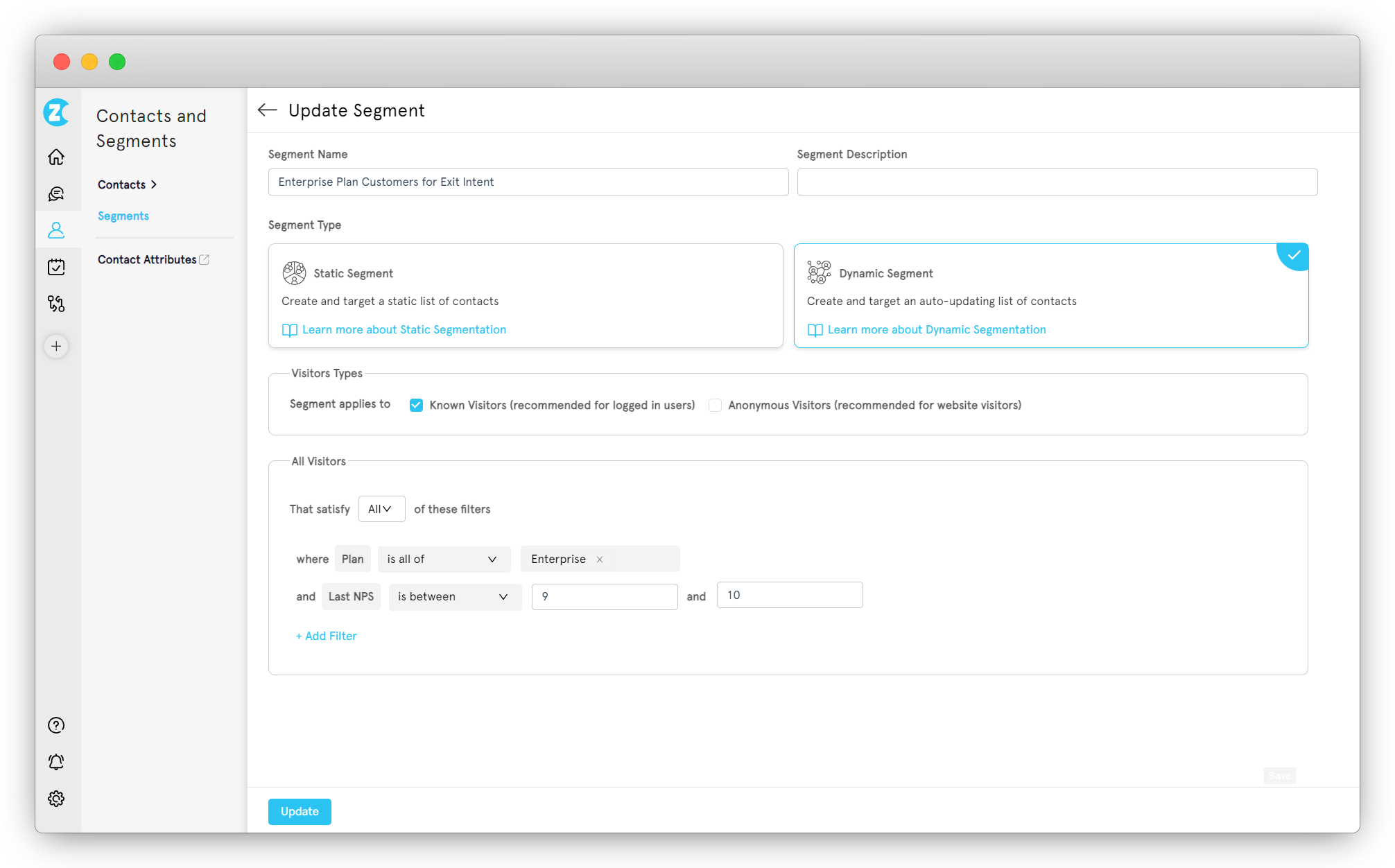
b. Segment by Engagement Level
-
Highly engaged users: They log in daily, use features actively, respond to past surveys. Send them more frequent surveys (quarterly relational + transactional after key events). They won't experience fatigue because they're already engaged with your brand.
-
Moderately engaged users: They use the product but aren't power users. Quarterly relational NPS only. Skip transactional surveys unless they trigger a major event (purchase, support ticket).
-
Low-engagement users: They signed up but barely use the product. Don't survey them. They don't have enough experience to give useful feedback, and sending surveys to inactive users tanks your response rate metrics. Wait until they re-engage, then survey them.
c. Segment by Product or Service Line
If you sell multiple products, segment surveys by which product the customer uses. Someone who bought Product A doesn't need a survey about Product B. Targeted surveys feel relevant. Generic surveys feel like spam.
Example: A SaaS company with three tiers (Starter, Pro, Enterprise) sends different surveys to each tier. Starter customers get a transactional NPS after onboarding. Pro customers get quarterly relational NPS focused on feature usage. Enterprise customers get quarterly relational NPS plus a dedicated relationship manager check-in.
d. Segment by Geography
Time zones matter. Send surveys at 10 AM in the recipient's local time, not yours. If you have customers across six time zones and you send at 10 AM Pacific, your East Coast customers are getting it at 1 PM and your European customers are getting it at 6 PM.
Cultural norms matter too. Some regions respond better to formal language, others to casual. Some prefer email, others prefer SMS or WhatsApp. If you have global customers, test delivery methods and tone by region.
Most customer feedback tools support segmentation, but you need to think through which segments actually matter for your business before building the rules.
How Zonka Feedback Solves Email Delivery Problems
We've spent this whole guide breaking down delivery mechanics. Here's how Zonka Feedback handles the technical side so you don't have to.
1. Wrong Timing Kills Response Rates
What goes wrong: Teams send NPS surveys at random times, or worse, at the same time for every customer regardless of time zone. Response rates tank.
How Zonka Feedback solves it: Time zone-based scheduling. You set the send time once (e.g., Tuesday, 10 AM). Zonka automatically delivers to each customer at 10 AM in their time zone. No manual segmentation. No multiple send batches. One schedule, global delivery at optimal local times.
Event-triggered automation for transactional NPS. You define the trigger (purchase completed, ticket resolved, trial ended), and Zonka sends the survey immediately. No delay. No manual follow-up.
2. Survey Fatigue from Over-Emailing
What goes wrong: Multiple teams want to send surveys. Marketing sends quarterly NPS. Support sends post-ticket CSAT. Product sends feature feedback requests. The customer gets hit with three surveys in two weeks and starts ignoring all of them.
How Zonka Feedback solves it: Throttling rules. You set a suppression window (e.g., 90 days), and Zonka blocks any survey from going to a customer who was surveyed in the last 90 days. Even if multiple teams are running surveys, the throttle applies across all of them.
Frequency caps per customer. You can limit how many surveys a single person receives per quarter, regardless of survey type.
3. Poor Deliverability (Spam, Bounces, Low Opens)
What goes wrong: Emails land in spam. Email addresses bounce. Sender reputation tanks because the list is full of inactive contacts.
How Zonka Feedback solves it: Authenticated sending. Zonka handles SPF/DKIM/DMARC setup so your emails come from a verified domain.
Deliverability monitoring. Track bounce rates, spam complaints, and open rates in real time. If deliverability drops, you see it immediately.
List hygiene automation. Zonka automatically suppresses hard bounces and flags soft bounces for review. You're not sending to dead addresses.
4. One-Size-Fits-All Emails Don't Work
What goes wrong: Every customer gets the same generic survey email regardless of their relationship with you, their lifecycle stage, or their engagement level.
How Zonka Feedback solves it: Advanced segmentation. Build segments based on CRM data, product usage, lifecycle stage, geography, or custom fields. Each segment gets tailored messaging, timing, and delivery channels.
Dynamic content. Personalize survey emails with customer name, recent purchase, support ticket details, or product-specific context. Not just "Hi [First Name]" but actual contextual personalization.
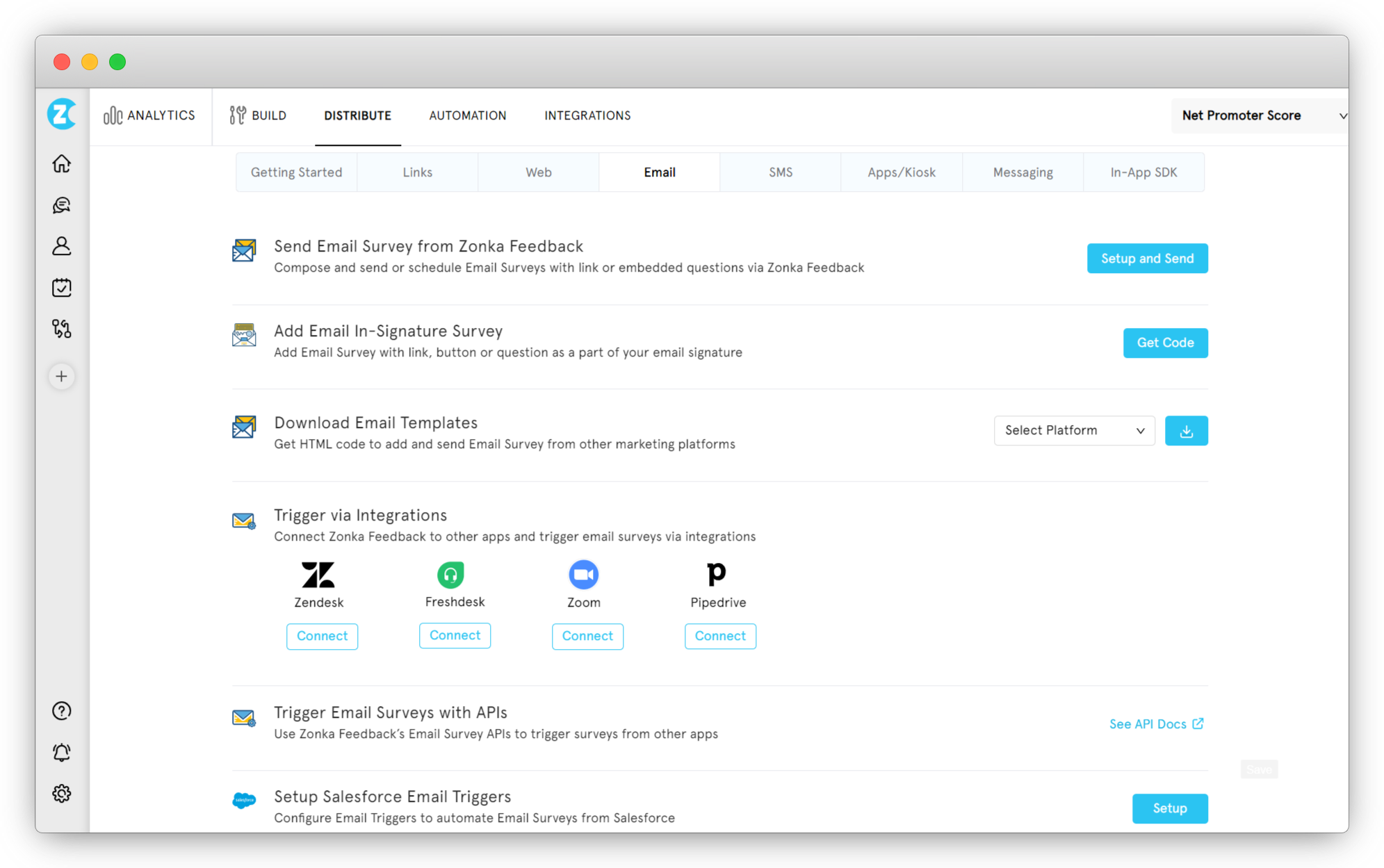
5. Can't A/B Test or Optimize
What goes wrong: You send the same email every time and never know if a different subject line, send time, or delivery method would work better.
How Zonka Feedback solves it: Built-in A/B testing for email campaigns. Test subject lines, email copy, send times, and delivery methods. Zonka tracks open rates, click rates, and completion rates for each variant so you can pick the winner.
Campaign analytics. See which segments respond best, which subject lines get opened most, and which send times drive completions. Use that data to optimize future campaigns.
6. Email-Only Misses Non-Responders
What goes wrong: Email-only NPS surveys suffer from non-response bias. Detractors don't open your emails, so your score skews artificially high.
How Zonka Feedback solves it: Multi-channel orchestration. Send the NPS survey via email first. If they don't respond within 5 days, Zonka automatically sends an SMS version. If they're an active product user, trigger an in-app survey. If they visit your website, show a web survey. All from the same campaign, all tracking responses in the same dashboard.
Channel preference tracking. If a customer consistently responds to SMS but ignores emails, future surveys go to SMS first.
When you're comparing NPS software platforms, delivery features matter as much as survey design. A beautiful survey that lands in spam at the wrong time to a fatigued audience is worthless.
What Comes After Delivery
Getting the survey delivered and opened is half the work. What you do after someone responds determines whether you actually improve your score or just collect data.
When an NPS promoter gives you a 9 or 10, that's your cue to ask for a referral, request a review, or invite them to a case study. When a passive gives you a 7 or 8, that's your chance to understand what would push them to a 9. When a detractor gives you a 0-6, you have 48 hours to close the loop before they churn.
None of that happens if your survey doesn't get delivered properly. This guide gave you the mechanics. The follow-up strategy comes next. We cover that in depth in our guide to NPS follow-up emails for promoters, passives, and detractors.
But before you get there, fix your delivery. Get your surveys into the right inbox at the right time in a format that makes responding easy. Everything else builds on that foundation.