.svg)
 Healthcare
 Finance
 Retail
 SaaS & Digital
 eCommerce
 Education
 Salesforce
  HubSpot
 Pipedrive
 Mailchimp
 Klaviyo
 Zendesk
  Intercom
 Freshdesk
 HelpScout
  Front
Front Jira
Jira Slack
Slack  MS Teams
 Zoom
Zoom Google Sheets
  Zapier
  Integrately
 Make
Make  Webhooks




 MS Teams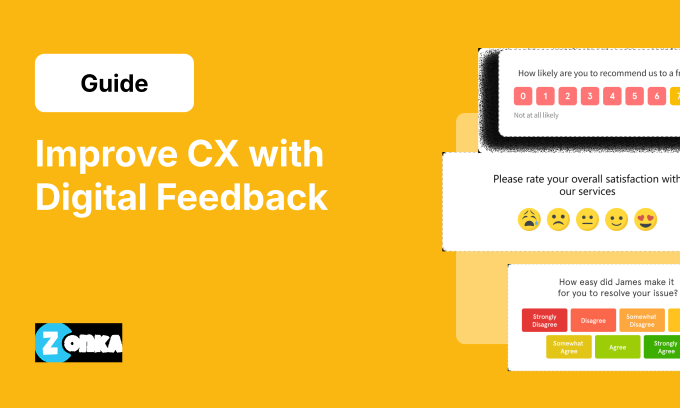


TL;DR
- Digital feedback is customer input collected through online channels (websites, apps, email, live chat, social media) in real-time as users interact with your product or brand.
- Unlike traditional surveys, digital feedback is triggered by behavior. That makes it faster, more contextual, and more likely to reflect what customers actually experienced rather than what they recall weeks later.
- There are 6 core types. Which ones matter for your business depends on where customers actually spend time with you, not on what's easiest to deploy.
- Collection method matters as much as channel. Behavior-triggered intercepts, passive widgets, and embedded micro-surveys each serve different moments and produce different signal quality.
- Most teams build the collection stage and stop. The act and communicate stages are where the program produces real value, and skipping them is why most feedback programs stop working.
Most teams running digital feedback programs have the same problem. They're collecting responses. Nobody's acting on them. A 2/5 CSAT after a support case sits in a dashboard. The account manager doesn't see it until a renewal conversation three months later. By then, changing anything is significantly harder.
That's not a technology problem. It's a process problem.
Digital feedback is customer input collected through online channels (websites, mobile apps, email, live chat, social media) at the moment customers interact with your product. The timing matters. A user rating an onboarding flow a month after they used it is giving you a general impression formed across multiple sessions. A user rating it right after they got stuck on step three is giving you something specific enough to act on. Same question. Different data.
This guide covers the 6 types of digital feedback worth building around, how to collect each one without disrupting your users, how to handle analysis when volume gets high, and how to set up a process that gets feedback to the person who can actually do something about it.
What Is Digital Feedback?
Digital feedback is real-time customer feedback collected through online channels (websites, mobile apps, email, live chat, and social media) as users interact with your product or brand. It includes both solicited signals (surveys, rating prompts, feedback widgets) and unsolicited signals (reviews, social mentions, chat transcripts). The defining characteristic: it's captured at the moment of the experience, not days or weeks later.
That timing difference is why digital feedback exists as a distinct practice. When a user rates a feature 2/5 right after struggling with it for 10 minutes, you're recording their immediate reaction. When that same user rates it on a monthly survey, you're recording a general impression formed across several sessions. Both are valid data. They are not measuring the same thing.
The Forrester CX Index 2025 found that the gap between experience leaders and laggards is widening, with 21% of brands declining in CX quality year-over-year. One pattern among teams falling behind: they collect feedback on a schedule rather than in the moment, missing the contextual detail that in-moment collection captures.
Digital Feedback vs. Traditional Feedback
The comparison matters, not because digital is inherently better, but because they measure different things. Using them interchangeably will leave gaps in your understanding.
| Dimension | Traditional Feedback | Digital Feedback |
| Timing | Scheduled, post-hoc | Triggered, in-moment |
| Scale | Limited by manual reach | Scales across all touchpoints |
| Context | Recalled experience | Live experience |
| Speed to insight | Days to weeks | Real-time to 24 hours |
| Signal type | Primarily solicited | Solicited + unsolicited |
| Depth | High (focus groups, interviews) | High volume, variable depth |
| Cost per response | High | Low at scale |
Traditional methods (focus groups, one-on-one interviews, phone surveys) produce more depth per response. You can follow up, probe, and understand nuance in ways a 3-question in-app survey cannot. Digital feedback produces more data points, faster, across more touchpoints. A complete program uses both. Choosing only one leaves the other's gap unfilled.
Why the Timing Difference Changes What You Learn
Recalled feedback and in-moment feedback don't just differ in how recent they are. They measure different things. A user who rates an onboarding flow 4/5 on a quarterly survey is giving you an average formed across multiple sessions, weighted toward the most recent one. A user who gives you 2/5 right after their third login, when they still can't find the API docs, is giving you specific, immediate user feedback you can act on the next day.
The longer you wait to collect feedback, the less specific it becomes. That's the practical reason in-moment collection is worth building around.
6 Types of Digital Feedback — and What Each One Is Actually Good For
Six core types: website feedback, in-app feedback, in-product feedback, email feedback, live chat and conversational feedback, and social media and review signals. Which ones belong in your program depends on where your customers actually spend time, not on what's fastest to set up.
| Type | Where It Lives | Best For | Signal Quality |
| Website Feedback | Marketing site, pricing pages, content pages | Navigation friction, conversion drop-off, content clarity | High for specific page-level issues |
| In-App Feedback (Mobile SDK) | Native iOS/Android apps | Post-session, onboarding checkpoints, core actions | High (mobile users respond at higher rates) |
| In-Product Feedback (Web) | SaaS dashboards, web platforms | Feature-level satisfaction, workflow friction | High (users at desk, more engagement time) |
| Email Feedback | Post-interaction, milestones, relationship moments | Post-support CSAT, relationship NPS, churn surveys | Medium-high (embedded questions boost rates) |
| Live Chat & Conversational | Support chat, chatbot logs, async messaging | Unsolicited complaints, feature requests, confusion patterns | High authenticity, needs tagging to be usable |
| Social & Review Signals | G2, Capterra, App Store, Twitter/X, Reddit | Brand perception, competitive intel, leading indicators | Variable (public, often strongly positive or negative) |
1. Website Feedback
Website feedback captures what users experience as they move through your pages: navigation, content clarity, conversion drop-off points, information gaps. It's most useful on high-exit pages, post-conversion pages, and content pages where user intent is clear but completion rates are low. Combining it with user experience surveys that ask structured questions at specific page moments gives you a clearer picture of what's reducing conversion rates.
A practical example: a SaaS company ran exit-intent surveys on their pricing page and found users were leaving because the tier comparison table didn't include API access information. The issue wasn't pricing. They updated the table and conversion rates improved measurably. That's the kind of specific, fixable problem website feedback identifies that analytics data alone won't show you.
Feedback widgets: Persistent buttons users click when they want to report something. Useful for catching issues outside your scheduled survey cadence.
Exit-intent surveys: Triggered when a user is about to leave the page. Most useful on high-stakes pages where you need to understand why users aren't completing an action. Starting with a product feedback survey template helps you structure questions correctly before building from scratch.
Embedded rating prompts: Inline ratings on content pages. Best suited for measuring content usefulness ("Was this helpful? Yes / No").
2. In-App and In-Product Feedback
Most articles treat these as the same category. They are not the same.
In-app feedback is collected inside a native mobile app (iOS or Android). It requires SDK integration and needs to stay lightweight. Mobile users have less tolerance for interruption than web users, so question length and timing rules are more strict. If your team is setting this up for the first time, the guide to in-app surveys covers setup logic and timing principles. SDK-specific tutorials are available for React Native, iOS, Flutter, and Android. To compare deployment options first, the in-app feedback SDK overview covers each option side by side.
In-product feedback is collected inside a web-based software product: a SaaS dashboard, a platform, an admin console. The deployment requirements are different, the user context is different (typically someone at a desk with more time to engage), and the optimal question depth is different. For in-product feedback configuration, the setup process differs considerably from mobile SDK. Verify both before selecting a tool.
Treating these as the same leads to wrong tool choices and poorly designed surveys. Your React Native app and your web dashboard require different approaches, even when the underlying metric is the same NPS question. If you're also running mobile app surveys, that's a third deployment pattern with its own timing and suppression rules.
3. Email Feedback
Email feedback works best for post-interaction moments when you know exactly who the user is and what just happened: post-onboarding, post-support resolution, post-purchase. The specific context is what makes the request feel relevant rather than generic.
On format: response rates are significantly higher when the first survey question is embedded directly in the email rather than linked to an external survey page. Every additional click required to answer is a point where users drop off. If you're running post-case CSAT via email using a link-only format, switching to embedded questions is a straightforward improvement.
Where email feedback doesn't work well: early-stage or discovery-phase feedback. If there's no established relationship with the user, the request feels out of place. Keep email for moments where the interaction context is recent and clear.
4. Live Chat and Conversational Feedback
Live chat transcripts, chatbot logs, and async messaging threads contain unsolicited feedback. Users aren't responding to a survey request; they're telling you something on their own initiative. That makes this data high in authenticity and volume, but difficult to use without a structured process for reviewing it.
Reading 500 chat transcripts manually each week is not a practical approach at scale. The volume makes it unmanageable without automated grouping. The value of this data only becomes accessible when you can identify patterns across it: 22% of this week's chats reference a specific checkout error, or a new feature is generating three times more support contacts than expected. Connecting this data to a broader product feedback strategy is what separates teams that learn from chat transcripts from teams that simply store them.
5. Social Media and Review Signals
Social media mentions and platform reviews (G2, Capterra, Trustpilot, App Store) are unsolicited, public, and often written when users feel strongly about something. They're your most reliable source for understanding brand perception and identifying product problems widespread enough to prompt unprompted commentary.
Where they have limited use: diagnosing specific UX issues. A G2 review stating "the reporting is confusing" points you in a direction but doesn't give you enough detail to act on directly. Social and review signals are most useful as leading indicators. A sustained decline in review sentiment often precedes a measurable NPS score decline. Don't rely on them as the primary input for product or feature decisions, but do treat them as an early warning system.
6. Passive Feedback Widgets (Always-On)
A persistent "Feedback" button on every page of your product gives users a way to report issues or share reactions at any point, without waiting for a survey prompt.
One important design note: data from passive widgets skews toward negative experiences by default. Users who are satisfied rarely seek out a feedback button to say so. Benchmarking satisfaction scores against widget responses will produce numbers that look worse than your actual satisfaction levels. Use widgets to catch issues that fall between your structured survey touchpoints. They function as an always-available bug report form for any user who encounters a problem, not as a satisfaction measurement tool.
How Do You Collect Digital Feedback? 5 Methods by Moment
Five core collection methods: behavior-triggered intercepts, always-on passive widgets, post-interaction automated surveys, embedded micro-surveys, and social and review monitoring. The error most teams make is applying the same method to every situation. Each method is designed for a specific type of moment.
1. Behavior-Triggered Intercepts
A survey is sent when a user meets a predefined condition: time on page, scroll depth, cart abandonment, feature activation, idle session, or a specific click pattern. This is the most contextually relevant collection method because the survey reaches users at the exact moment they've done something worth asking about.
The main risk is frequency. A survey that appears on every page visit, within seconds of loading, across every session will reduce response rates and create a poor user experience. Keep it to one intercept per session. Set a 30-day suppression period after any response. Apply a frequency cap across all active surveys per user.
2. Always-On Passive Widgets
A persistent feedback button on every page collects low-friction, low-volume input. Signal quality is high for critical issues and bugs because users who click it without being prompted have a specific reason to do so. Passive widgets are not a reliable satisfaction measurement tool. They work best alongside structured surveys, not as a replacement for them.
3. Post-Interaction Automated Surveys
Sent after a defined event: support case resolved, onboarding milestone completed, purchase confirmed, subscription renewed. These are the primary vehicles for CSAT and CES measurement. Send within 2 hours of the event. Response rates decline significantly after 24 hours. The longer users wait, the less they recall about the specific interaction.
One configuration detail that affects data quality: map each survey response to the record that triggered it. A CSAT response mapped to a Contact record instead of the Case record removes your ability to tie scores to specific agents, case types, or resolution times. Map responses as close to the triggering event as possible.
4. Embedded Micro-Surveys
A 1-3 question prompt built directly into the interface, rather than delivered as a popup. This format creates less disruption than a modal window. It works well for feature-level feedback ("Was this report useful?") and content effectiveness ("Did this answer your question?"). It doesn't work well for relationship-level metrics. An NPS question embedded in a dashboard sidebar is out of context and tends to produce unreliable data.
5. Social and Review Monitoring
This is a listening method, not a survey method. Tools in this category aggregate platform reviews, app store ratings, social mentions, and community discussions into a single view. It works best as a supplementary signal alongside structured feedback, not as a standalone input.
Setting up alerts for sentiment drops is worth doing. A spike in 1-star reviews on a specific day is more useful if you see it the same day rather than when it appears in a weekly summary.
How Do You Analyze Digital Feedback at Scale?
At low response volume, reading responses directly is practical. At 500 or more responses per month, you need a structured analysis process. Without one, you have raw data rather than usable information. Most digital feedback programs run into problems at the analysis stage, not the collection stage.
Thematic Analysis — Grouping Feedback Into Patterns
Manual tagging is workable at 50 responses per month. At 500 or more, automated thematic grouping becomes necessary. Automated thematic analysis organizes 600 open-text comments into a structured breakdown: 34% relate to wait time, 22% relate to a specific feature gap, 18% relate to onboarding. That output is directly usable for prioritization decisions. A product manager can take it to a planning meeting. A support team lead can use it to brief their team. That's the practical output analysis at scale should produce.
Sentiment Analysis — What Scores Don't Capture
A 4/5 rating paired with a comment that says "I suppose it worked but I still don't understand why it broke" does not reflect a satisfied user. The numeric score and the written response tell different stories.
Automated sentiment analysis identifies the tone that scores don't reflect. It's particularly useful for responses where the rating and the comment contradict each other. It's also useful for identifying user frustration before it shows up in churn numbers. A set of 4-star responses with consistently critical language represents a retention risk that numeric scores alone would not indicate.
AI-Powered Feedback Intelligence — From Reading to Querying
Standard feedback analysis requires someone to read through responses, apply tags, and produce a report. AI-powered analysis replaces that reading process with direct querying. The difference in how teams actually use feedback is significant.
Instead of an analyst spending four hours producing a theme report, anyone on the CS or product team can ask: "What are the top drivers of low CSAT in the enterprise segment this quarter?" and receive a structured answer in seconds. Zonka's AI Feedback Intelligence covers thematic analysis, sentiment analysis, entity and aspect tracking, and Ask AI, a natural language query interface for your full feedback dataset. When analysis doesn't require a dedicated analyst to run, more people use it and they use it more consistently.
What Is the Digital Feedback Loop — and Why Do Most Teams Only Build Half of It?
A digital feedback loop covers the full sequence: collect, analyze, act, communicate. Most teams invest heavily in Stage 1 and do little with the rest. Stages 3 and 4 are where the program produces results, and leaving them undefined is the most common reason feedback programs stop being useful. For a detailed breakdown of where this fails in practice, the product feedback loop guide covers the specifics.
The 4 Stages
Collect: channel, method, and behavioral trigger (the where and when of feedback gathering)
Analyze: thematic grouping, sentiment analysis, and AI-assisted querying (converting raw responses into patterns worth acting on)
Act: routing feedback to the right person, with the right context, within the time frame where action is still possible (requires a defined SLA by score range)
Communicate: informing customers about changes made based on their input (this directly affects how many respond to future surveys)
Most investment goes into Stage 1. Most of the program's practical value comes from Stages 3 and 4.
Where the Process Breaks Down
Stage 3 is where most programs stop producing results. Feedback gets reviewed on a schedule that is slower than the rate at which customers make decisions about whether to stay or leave.
A detractor NPS response submitted on Monday morning should not reach the account owner on Thursday. The customer has already formed their view of whether the company is responsive by then. The solution is automated routing: low scores are assigned to the right person immediately, a task is created, a Slack notification is sent, a ticket is opened, without requiring anyone to check a dashboard on a schedule. The closing the product feedback loop guide covers routing rules, SLA structures, and Stage 4 communication in detail.
Stage 4 problems are less visible but equally costly. A customer submits critical feedback. The team acts on it. The product is updated. The customer receives no notification. They submit the same feedback six months later because nothing in their experience confirmed the issue was addressed. Stage 4 is not a courtesy step. It's what determines whether customers continue providing useful input over time.
What Automation Does for Stages 3 and 4
- NPS detractor response: CS task created, assigned to account owner, SLA clock starts
- CSAT below threshold: Zendesk ticket opened automatically, linked to the specific case
- Post-onboarding NPS drop: account manager notification sent with customer segment context
- Passive widget report: Jira ticket created, routed to the relevant product engineering team
These are standard automation rules, not custom development projects. Zonka's CX automation handles trigger conditions, routing logic, and suppression rules without requiring developer involvement. The reason most teams don't have this in place is not technical complexity. It's that the routing process was never defined before the surveys went live.
A low score that receives no follow-up is more damaging than sending no survey at all. Customers who submitted feedback and received no response are more likely to assume the company doesn't act on input than customers who were never surveyed. Define the response process before you start collecting.
Which Digital Feedback Tools Should You Consider?
Tools in this category fall into three types. Which type fits your situation depends on whether your primary need is collection, analysis, or managing the full process. Selecting a tool before clarifying that often results in buying more capability than you'll use or less than you need.
Survey-First Tools
Best suited for teams that know what questions to ask and need to distribute surveys across multiple channels. Analysis capabilities are typically limited. These tools handle collection well, but processing and acting on the data requires a separate process. You get collection. Analysis is handled elsewhere.
Analytics-First Tools
Best suited for teams that already have feedback data and need to organize and interpret it. Capabilities include thematic grouping, sentiment scoring, and entity mapping. These tools typically require structured data input from a separate collection tool. Analysis is their strength. Collection is not.
End-to-End CX Platforms
Best suited for teams that need collection, analysis, and response workflow in one system. Initial setup takes more time. Capability at volume is significantly higher.
Zonka Feedback is in this category. We offer multi-channel collection across website, in-product, in-app SDK, email, SMS, and WhatsApp, combined with AI Feedback Intelligence for thematic analysis, sentiment analysis, entity tracking, and Ask AI. We're the team behind Zonka, and we've described these categories based on what each type genuinely does well. For SaaS teams specifically: whether a platform supports both native mobile SDK and web-based in-product collection is worth verifying early. Not all platforms offer both, and discovering that gap after implementation creates significant delays.
For a detailed comparison of tools in this category, see the roundup of product feedback tools and the list of best in-app survey tools. Both are updated regularly and evaluated against real SaaS team requirements.
How to Build a Digital Feedback Strategy in 5 Steps
Building a strategy means deciding, before you configure a single survey, where you'll collect feedback, what method you'll use, how you'll process responses, and who is responsible for acting on them. Teams that skip this planning end up with a collection setup rather than a working feedback program. For broader context on program architecture, the product feedback guide covers the full structure, not just the collection side.
Step 1: Map Your Touchpoints
List every place a customer interacts with you digitally: website, product, mobile app, email, support chat, social media. Each is a candidate for a collection point, but not every touchpoint needs active feedback collection. Prioritize based on where users encounter problems and where they make key decisions. A pricing page and an onboarding flow are worth covering. A general blog page is not.
Step 2: Match Type to Moment
Post-interaction moments require automated email surveys. In-session difficulties require behavior-triggered intercepts. Feature-level questions work with embedded micro-surveys. Brand perception questions require social listening, not a survey. How you segment your users also affects which type reaches which audience. Trial users, power users, and enterprise accounts don't need the same survey at the same time. For a detailed view of the ways to collect product feedback across touchpoints, including channel-specific timing guidance, that guide covers the full decision framework.
Step 3: Build the Collection Layer
Select tools, set up triggers, and configure suppression rules. Suppression matters as much as collection setup. Avoid sending surveys to the same user across three channels in the same week. Apply a 30-day suppression period after any response. For high-traffic pages, set a sampling rate rather than surveying every visitor. A page with 50,000 monthly sessions doesn't require input from every user to produce reliable data.
Step 4: Set Up the Analysis Layer
Determine what you need from analysis before you decide how to do it. If the main challenge is volume, you need automated thematic grouping. If the main challenge is depth, you need a process for reading and following up on responses directly. Set a regular analysis schedule before responses start arriving: a weekly thematic review, a monthly trend summary, and real-time alerts for significant score drops. Analysis that isn't scheduled tends not to happen on any consistent basis.
Step 5: Define the Response Process Before You Launch
This step is skipped more often than any other. Before any survey goes live, answer these questions: who receives a notification when a score drops below a defined threshold? What is the expected response time? How will the customer be informed if their feedback resulted in a change?
The collection stage is straightforward once configured: surveys go out, responses come in. The act and communicate stages require organizational decisions that can't be added after the fact without disruption. Define who owns each response type, what the follow-up process looks like, and how customers will be informed. Make those decisions before the first response arrives, not while reviewing a backlog of unactioned low scores.
The Metric Most Digital Feedback Programs Never Track
Most programs are evaluated on collection metrics: response rate, survey volume, NPS score over time. Those numbers tell you how much data you're collecting. They don't tell you whether the program is producing results.
The number that actually tells you whether the program is working is loop closure rate: of every low score submitted, what percentage received a follow-up, got resolved, and had the customer informed?
Most teams can't answer that. Not because the data isn't available, but because the response process was never defined when the program was set up. That's the part worth getting right first.
To see how companies put these principles into practice, explore product feedback examples.
Ready to build a digital feedback program that goes beyond collection? Zonka Feedback gives you multi-channel collection, AI-powered analysis, and automated routing so every response reaches the right person fast enough to act. Schedule a demo →