.svg)
 Healthcare
 Finance
 Retail
 SaaS & Digital
 eCommerce
 Education
 Salesforce
  HubSpot
 Pipedrive
 Mailchimp
 Zendesk
  Intercom
 Freshdesk
 HelpScout
  Front
Front Jira
Jira Slack
Slack  MS Teams
 Zoom
Zoom Google Sheets
  Zapier
  Integrately
 Make
Make  Webhooks




 MS Teams


TL;DR
- At onboarding, run a CES slide-up after each setup step and pass
onboarding_stepto isolate which step scores lowest. - For feature adoption, trigger a feature CSAT popover after 3+ uses. First-use feedback is noise. Repeated use is signal.
- For product health, run NPS as a popup every 90 days to active users only. Segment by
subscription_planor the number means nothing. - At the PLG conversion stage, fire an intent popup at the usage-limit hit and on day 14. These are your two highest-honesty moments.
- For churn and exit, trigger a popup on cancellation click with defined options. Each answer should route a workflow automatically.
- Set a 30-day throttle per user across all survey types and pass user variables, or the responses won't be segmentable.
Most SaaS product managers have a version of the same problem.
They send NPS surveys. They add a satisfaction widget to the dashboard. They review the scores after each sprint. But the responses feel disconnected: generic ratings from users who may have just logged in, who haven't touched the feature being asked about, who signed up last week and have no meaningful opinion yet.
The feedback exists. It just doesn't mean much.
The reason isn't the tool. It's the approach. Product feedback works when it's tied to a product moment, not a date on the calendar. A CES survey that fires after a user completes onboarding step 3 tells you exactly where the setup flow breaks. A satisfaction popup that fires on the second Tuesday of every month tells you very little about anything.
This guide covers how to structure product feedback around the stages users actually go through, from first login to feature adoption to renewal decisions. You'll find the right survey type for each stage, the widget and trigger that fit without disrupting the user experience, and the variables that turn raw responses into data you can actually segment.
Why Product Managers Need a Different Approach to Feedback
Product feedback is a program, not a campaign. Most SaaS teams treat it like a campaign: something you run quarterly, batch-process, present in a review, and repeat. The problem with that model is that it divorces feedback from the product moment it's supposed to measure.
A product manager doesn't need to know how 2,000 users felt on a Tuesday in March. They need to know:
- How users experience their first attempt at completing onboarding
- Which features users find genuinely useful after using them more than twice
- What's driving detractor scores among Enterprise users on the highest-tier plan
- What a user's honest reason is for cancelling, right at the moment they decide to leave
None of those questions are answerable by a once-a-quarter blast. So why do most SaaS teams still run one?
There's also a distinction between qualitative and quantitative feedback that most PMs understand in theory but rarely act on. Quantitative feedback (NPS scores, CSAT ratings, CES numbers) tells you what is happening. Qualitative feedback (open-text follow-ups, written cancellation reasons, feature suggestions) tells you why. You need both running in parallel, tied to the moments they're designed to measure. A score without the open text that follows it is half a signal.
One more thing worth naming upfront: product feedback isn't owned by a single team. CS owns post-resolution CSAT and churn signals. Marketing owns website visitor research and trial conversion feedback. Product managers own in-product feedback — what happens inside the logged-in experience, at specific feature touchpoints, across the product lifecycle. That's the territory this guide covers.
G2, one of the largest SaaS review platforms in the world, doesn't run a blanket survey across their site. They target specific pages (review submission, pricing, research) with different surveys tuned to the intent of each. Over 33,000 responses collected, each tied to a user's specific context. That's what a feedback program looks like.
Collecting Product Feedback at Each Stage of the Lifecycle
Product managers who build effective feedback programs organize around stages, not channels. The channel (in-app, email, SMS) follows from the stage. Not the other way around.
Here's the full map before the detail:
| Product Stage | Survey Type | Widget | Trigger |
| Onboarding | CES | Slide-up | After each setup step completes |
| Feature adoption | Feature CSAT | Popover | After 3+ uses of the feature |
| Product health | NPS | Popup | Every 90 days, active users only |
| PLG conversion | Intent / open-ended | Popup or slide-up | Day 14 or usage-limit hit |
| Churn / exit | Churn reasons | Popup | On cancellation click |
Finding Where Onboarding Users Get Stuck
Onboarding feedback answers one question: where are users hitting friction before they reach first value? By the time churn data confirms there's a problem, it's already happened to dozens of users. Onboarding CES surveys catch it early.
The survey type is CES: "How easy was that?" Triggered after each setup step completes. Not at the end of onboarding, at each step, because friction isn't uniform. Step 2 might score 4.5. Step 5 might score 2.1. You can't see that gap if you ask once at the end.
A slide-up is the right widget: non-blocking, appears at the bottom of the screen right after the step completes, disappears when dismissed. It doesn't interrupt the next action the user wants to take.
Trigger it on the event. When the user completes the step, the survey fires. Not after 30 seconds. Not on page load. On the event.
Pass onboarding_step as a variable so you can filter responses by step in your dashboard. Without it, you have an average CES score. With it, you have "step 5 scores 2.1, step 3 scores 4.8" — and you know exactly where to look.
On day 7, add a CSAT popup: "How's your experience so far?" By then, users have enough context to give a meaningful answer. The slide-up caught the tactical friction. The popup catches the overall first impression.
A SaaS onboarding survey template will get your question flow structured and your response rates where they need to be.
Understanding If Shipped Features Are Actually Working
Feature feedback answers the question usage metrics can't: a user might be engaging with a feature and finding it frustrating. Usage numbers don't tell you that. A contextual survey does.
Two approaches exist, and they answer different things.
The first is a popover, a contextual widget that opens when the user clicks a "rate this feature" button positioned next to the feature. It's user-initiated, so it captures users with strong opinions. It biases toward the vocal minority, useful for catching severe problems but not representative of your typical user.
The second is a slide-up triggered after the user has engaged with the feature at least three times. First-use feedback is noise. A user who's interacted once doesn't have a reliable opinion yet. Three uses gives you a real signal. Pass feature_name and usage_count as variables, and you'll be able to filter by feature and by experience level before you read a single response.
Always pair the rating with one open-text follow-up: "What would make this feature more useful?" The score tells you there's a problem. The open text tells you what it is. Without the qualitative layer, you're left with a number and no idea what to do with it.
Running NPS and CSAT at the Right Cadence
NPS measures loyalty at the relationship level: how your product is tracking overall, not how a specific interaction went. Run it on a 90-day cadence to active users only.
The widget is a popup. NPS is a relationship question and requires the user's full attention. A slide-up that can be dismissed with a flick isn't the right surface for a question that carries strategic weight.
Targeting matters as much as the question itself. Pass days_active and restrict to users with 30 or more days of activity. Users with less context give you scores that drag down your average and send your roadmap in the wrong direction. Show the survey to 20–30% of qualifying users at a time, using percentage targeting, to avoid saturating your user base.
Pass subscription_plan and signup_date as variables. Aggregate NPS is a vanity metric. Segmented NPS is a strategic signal. When Enterprise users score 68 and free-tier users score 31, you know which product gaps matter most, and to whom.
Use this as your decision table for which metric to run when:
| Metric | What it Measures | When to Run |
| NPS | Overall loyalty: likelihood to recommend | Every 90 days, users with 30+ days active |
| CSAT | Satisfaction with a specific interaction | After feature use, post-support, post-onboarding |
| CES | Effort required to complete a task | After setup steps, after key in-product workflows |
For the full measurement and benchmarking setup, see how to measure NPS in SaaS.
The Product-Market Fit Survey
The PMF survey asks one thing: "How would you feel if you could no longer use this product?" If 40% or more say "very disappointed," you've likely hit product-market fit. That benchmark comes from Sean Ellis, who identified it across hundreds of startups after finding that products clearing 40% consistently achieved sustainable growth, while those below it consistently struggled.
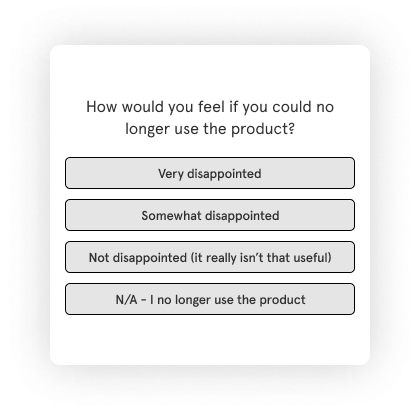
Run it as a popup. Show it only to users with days_active > 30. Anyone earlier hasn't used the product enough to give you an honest answer, and pulling them into the sample pulls your score down artificially.
Pass subscription_plan and acquisition_channel alongside days_active. PMF by segment tells you where the fit is strongest and which user profile to build toward. That's a more actionable output than a single aggregate number.
What Drives Free-to-Paid Upgrades
In a product-led growth model, the product is the sales team. The feedback that happens between free signup and paid upgrade is some of the most valuable data a PM collects.
Three trigger moments give you honest answers.
The usage-limit hit: when a user runs up against a capacity constraint, trigger a popover right at that moment: "What would you do with more?" The context is perfect. They've just experienced the constraint and their motivation to answer is at its peak. Pass plan_type and feature_attempted.
Day 14 of the free plan: a popup asking "What would make you upgrade?" After two weeks, users have formed a real opinion. If a user responds "not sure," a workflow fires and auto-alerts sales for a personal follow-up.
Trial day 3 and day 7: slide-ups on overall experience. Three touchpoints across the trial window gives you a view of how perception evolves, and where it starts to stall.
Pass trial_day and activation_status alongside every response. If 40% of free users are citing the same missing feature in their day-14 responses, that feature belongs on the roadmap, with the evidence to back it up. For a deeper look at setting these up, the digital feedback guide covers the full configuration.
Churn and Exit Surveys
When a user clicks "Cancel subscription," a popup fires immediately. That's the moment of highest honesty: the decision is already made, and users have no reason to soften their answer.
The question: "What's the main reason you're leaving?" with defined options: pricing, missing features, switching to a competitor, not using it enough, other. Each response routes a workflow automatically. Pricing → CS alert for a retention conversation. Missing feature → Jira ticket created.
For a full churn feedback strategy (what to ask, when to ask it, and how to reach users after they've left), see how to collect feedback from churned SaaS customers.
How to Configure In-App Surveys That Don't Interrupt Your Users
Configuring in-app surveys well comes down to two decisions: choosing the right widget for the right moment, and setting triggers that fire on user behavior rather than time. Once set up correctly, no one on your team needs to touch the configuration again.
Choosing the Right Widget
| Widget | How It Appears | Intrusion Level | Best PM Use Case |
| Popup | Centre screen, overlays content | High | NPS, PMF: questions needing full attention |
| Slide-up | Slides from bottom edge | Low | CES after tasks, quick feature CSAT |
| Popover | Opens next to a specific element | Minimal | Contextual feature feedback |
| Sidebar / Feedback button | Permanent tab on screen edge | Zero (user-initiated) | Bug reports, feature requests, always-on |
One practical note on workspace constraints: each workspace supports one active popup, one active popover, and one active sidebar at a time. If you need two popups running on the same surface, you need two workspaces. For most SaaS product teams, the setup is straightforward: one workspace for the marketing website, one for the logged-in product, one for the help center. Each gets its own JS code. No widget conflicts.
When the Survey Should Fire
Event-based triggers are the most useful for product managers because they tie the survey to something the user just did. A survey about onboarding should fire when onboarding happens, not 30 seconds after page load.
The options:
- Time-based: fires after X seconds on a page. Lowest signal quality for product surveys.
- Scroll-based: fires at X% scroll depth. Useful for documentation, rarely for in-product.
- Event-based: fires when a user completes a specific action. This is the one.
- Exit intent: fires when the cursor moves toward the browser tab close. Best for exit and cancellation surveys.
If you can't name the specific product event this survey should respond to, the trigger isn't ready yet.
Who Sees It and Where
Page-level targeting restricts a survey to specific URLs. The NPS popup belongs on the dashboard, not on every page in the product. Percentage targeting shows the survey to 20% of qualifying users, which prevents over-surveying without reducing sample quality.
In logged-in mode, segment targeting uses the user attributes you're passing to define who qualifies. Show the upgrade-intent popup only to users with plan_type = free. Show the PMF survey only to users with days_active > 30. The survey fires for the right person, at the right moment, in the right context.
Passing User Variables
Anonymous mode collects responses without user identity. Logged-in mode connects every response to a user profile. For in-product surveys, always use logged-in mode.
Default variables (email, name) are available automatically. The custom variables that change how useful your data actually is:
| Variable | What It Unlocks |
subscription_plan |
Segment NPS and PMF scores by plan tier |
days_active |
Filter new users out of health and PMF surveys |
feature_used |
Connect feature feedback to the specific feature rated |
onboarding_step |
Isolate which setup step scores lowest on CES |
trial_day |
Track how experience evolves across the trial window |
activation_status |
Separate activated from non-activated users in conversion surveys |
Without variables, you have aggregate scores. With them, you have "Enterprise users active for 60+ days score NPS 68. Free users in their first 30 days score 31." Which of those two numbers actually changes what you build next? Choose a SaaS feedback platform that supports custom variable passing natively. Retrofitting it later is harder than setting it up right the first time.
Other Feedback Sources Product Managers Should Use
In-app surveys are the primary channel for product managers, but they aren't the only one worth running. A few others deserve a place in your program.
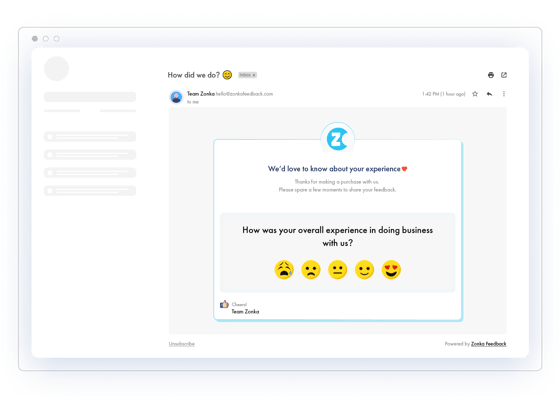
Email surveys work best for relationship NPS (not tied to a specific product moment), post-trial surveys, and reaching lapsed users who've stopped logging in. Embed the first question in the email body rather than linking to a separate page. Click-to-respond has measurably higher completion rates. Pass variables via the survey link so responses stay segmentable.
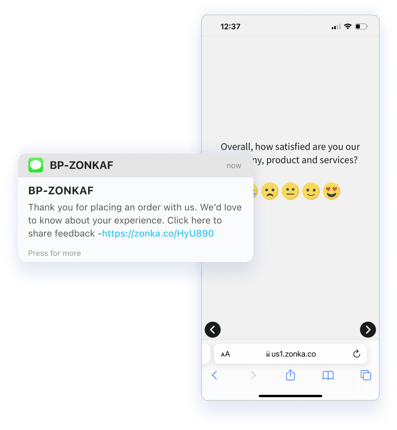
SMS surveys carry industry-reported open rates of around 98%, which makes them effective for one-off high-stakes moments: post-support resolution, post-onboarding call, post-appointment. Use them sparingly. High recipient attention also means low tolerance for frequency: users who receive repeated SMS surveys opt out. Reserve SMS for moments where speed of response matters.
Support ticket analysis belongs in the product intelligence layer when you stop reading tickets individually. A spike in tickets about a specific feature after a product update is a product signal. Treat it as one. AI surfaces recurring themes from ticket volume at scale. This is where the data already exists.
Call recordings (from sales, CS, and onboarding calls) contain unsolicited product feedback that most PMs skip entirely: feature requests, friction points, competitor mentions. AI transcript analysis surfaces themes across hundreds of calls in the time it would take to listen to three. Don't ignore this source.
Review platforms (G2, Capterra, Trustpilot) give you feedback from users who had no incentive to soften their answers. Filter by feature tags and usability categories. Reviews from churned users, in particular, are among the most honest signals you'll find anywhere.
Social listening surfaces what users say about the product in public on LinkedIn, Reddit, and X: observations and frustrations that never make it into a survey. It's qualitative feedback from your most candid users. It belongs in the same analysis layer as everything else.
For the tools that support each of these channels, see SaaS product feedback tools. For Voice of Customer programs that tie multiple sources together, see VoC tools for product teams.
How Often Should You Survey SaaS Users
Survey fatigue is a data quality problem before it's a user experience problem. Users who receive too many surveys stop responding meaningfully, or stop responding at all. The responses you collect from a fatigued user base look fine in aggregate and tell you almost nothing useful.
Throttle controls set a minimum gap between surveys per user regardless of survey type. A 30-day minimum is a reasonable baseline: no user should receive more than one survey of any type within a 30-day window.
Cadence by survey type:
- NPS: once every 90 days per user
- Feature CSAT: once per feature, after 3+ uses
- CES: immediately after the event it's measuring
- PMF: once, when the user crosses the 30-day active threshold
- PLG intent: once per trigger moment (usage limit hit or day 14)
Workspace separation helps here too. Marketing and product surveys live in separate workspaces with separate JS code, so their popup slots don't compete. Your CS team's post-support popup and your product team's NPS popup won't fight each other on the same page.
Display frequency settings matter more than most teams realize. "Show once" is right for PMF and first-impression surveys. "Show until submitted" works for NPS and health surveys where the response has real strategic value. "Show every session" is for always-on channels (the feedback button and bug report sidebar) where user initiation is the trigger.
One thing that gets overlooked: always send an auto-acknowledgement when a response comes in. Users who know they were heard respond to future surveys at higher rates. It's a small mechanic with compounding value at scale.
For the structural mistakes that reduce response quality before a single response comes in, see common mistakes in SaaS feedback form design.
What to Do With the Feedback You Collect
Collecting feedback is half the job. The other half is making sure someone can act on it — and that means not reading 2,000 NPS comments one by one.
AI analysis clusters open-text responses into recurring themes automatically. Instead of reading individual responses, you see: pricing friction at 28%, missing integrations at 22%, performance issues at 18%. The question becomes "which theme do we address first?" not "where do we even start?"
Routing matters too. Product feedback goes to the PM. Support signals go to CS. Agent-level feedback goes to the support manager. Everyone sees the slice relevant to them. No one gets a wall of unfiltered responses with no clear owner.
And on roadmap prioritisation: not everything users ask for should be built. That's not a cynical observation — it's a product discipline. Weigh themes by segment before presenting to leadership. A feature request from 30% of Enterprise users on a high-ARR plan is a categorically different signal than the same request from 30% of free users. Pass subscription_plan, filter your analysis, then prioritise.
When you're ready to close the product feedback loop, routing signals to action and letting users know what happened as a result, the full system is in the SaaS feedback management guide.

Start With One Stage
A quarterly NPS survey isn't a feedback program. It's a single data point.
A feedback program maps questions to moments. It connects responses to the user who gave them. It routes signals to the people who can act on them. And it runs continuously, at the right intervals, with the right context, so your product team always knows what's working and what isn't, without waiting for a review cycle to find out.
Start with one lifecycle stage. Set up an event-based CES slide-up for your onboarding flow. Pass onboarding_step. See what comes back in the first two weeks.
Build from there.
Explore the SaaS feedback management guide to see how the full system fits together, or start collecting today with a SaaS onboarding survey template and get your first in-product survey live this week.